








API portals are developer-facing interfaces that expose APIs with documentation, authentication, access controls, and usage tracking – enabling developers to discover and consume APIs without platform team involvement. They fall into two categories: external API portals (exposing product APIs to third-party developers – Kong, Apigee, Stoplight) and internal API portals (exposing IaC automation APIs to internal teams – Cycloid, Backstage). API portals differ from API gateways, which route and manage traffic but do not provide a developer-facing self-service interface.
__________________________
APIs are no longer isolated services, they are the connective tissue of modern applications, enabling seamless integration across platforms, microservices, and external ecosystems. Yet, as organizations scale their APIs, a common challenge emerges: how do you make these APIs easily discoverable, testable, and usable while maintaining consistent security and governance? An API Developer Portal addresses this need by offering a centralized hub where developers can explore, onboard, and interact with APIs in a structured and self-service manner.
This guide provides a hands-on approach to building such a portal, highlighting key components, practical workflows, and best practices. It also explores the technical considerations, automation, governance, documentation, and developer experience, that ensure a portal is more than a static reference page. Instead, it becomes a dynamic, interactive gateway that accelerates API adoption while enforcing consistency across teams and environments.
Internal vs External API Portals: Why the Distinction Matters
Most API portal guides focus on external portals – the public-facing developer hubs that companies like Stripe, Twilio, and Plaid use to onboard third-party developers. External portals handle consumer registration, API key issuance, monetization tiers, and public documentation.
Internal API portals solve a different problem. Platform teams in enterprise environments need to expose IaC automation APIs, cloud provisioning endpoints, and shared service APIs to their own developers – with RBAC, SSO, and governance built in. The audience is internal, the APIs are infrastructure-facing, and the goal is reducing ticket-based bottlenecks rather than driving external API adoption.
This guide covers both categories but focuses on the internal use case – where Cycloid’s IDP-native approach provides a foundation that purpose-built API management tools (Kong, Apigee) do not address. If your primary need is exposing product APIs to external developers, tools like Kong Developer Portal or Stoplight are a better starting point. If you need to give internal teams self-service access to infrastructure and automation APIs, read on.
What is an API Developer Portal?
An API developer portal could host APIs for product catalogs in e-commerce, compute and networking in cloud platforms, or task management and integrations in SaaS tools, understand how to use them, test endpoints, and access authentication credentials. Unlike static documentation sites or fragmented wikis, a developer portal consolidates everything needed to integrate APIs efficiently, often including interactive API explorers, versioned documentation, and sample SDKs to speed up development.
The portal serves as the single source of truth for API consumption, functioning like Stripe’s API dashboard or Twilio’s console, enabling developers to self-serve keys, documentation, and usage analytics without relying on ticket-based workflows. By offering a structured and interactive experience, it encourages faster adoption of internal, partner, or public APIs while improving the overall developer experience.
As organizations scale their API ecosystems, internal developer portals become critical for streamlining API discovery, onboarding, and governance. While external API management portals focus on public or partner-facing consumption, internal platforms provide a controlled environment for teams to model, provision, and manage APIs consistently. Cycloid, positioned as an Internal Developer Platform (IDP), offers a suite of features that make it a strong foundation for such internal portals.
In the sections below, we’ll explore Cycloid’s capabilities and evidence, outline how it differs from traditional API developer portals, and provide a practical mapping for using Cycloid to build an internal API portal, showing how pipelines, StackForms, and governance controls come together to deliver a developer-friendly experience.
What Cycloid Actually Provides (and Evidence)
Cycloid is primarily positioned as an Internal Developer Platform (IDP) rather than a conventional API developer portal. Its design focuses on providing internal teams with self-service capabilities for provisioning, managing, and governing infrastructure and services, including APIs. Here’s a detailed breakdown of its capabilities:
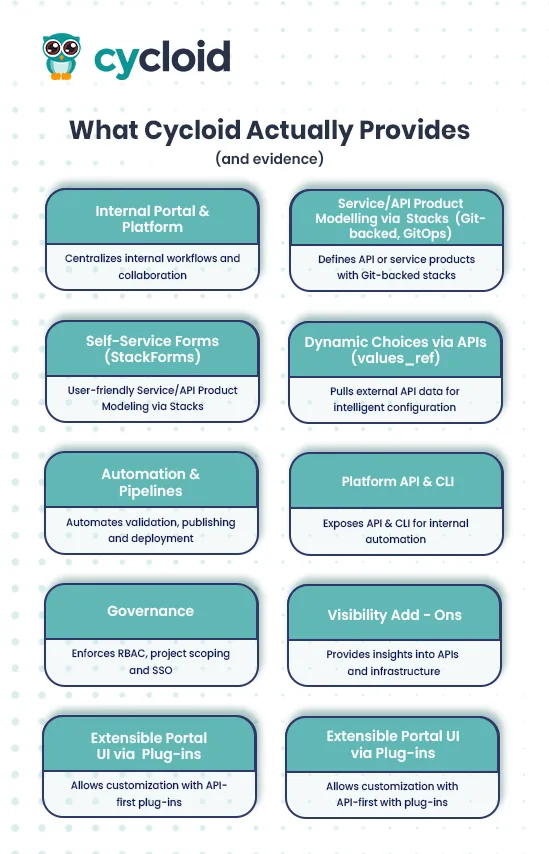
- Internal Portal & Platform
Cycloid centralizes internal workflows into a single platform where developers and platform engineers can discover, manage, and interact with APIs and services. Unlike traditional external-facing portals, Cycloid’s strength lies in enabling internal collaboration and governance, making it a suitable base for an internal API developer portal. - Service/API Product Modeling via Stacks (Git-backed, GitOps)
Cycloid uses Stacks as a way to define API or service products declaratively. Each stack contains configuration templates, pipelines, and metadata that allow teams to provision resources consistently. This GitOps approach ensures that all API deployments are reproducible, auditable, and integrated into a CI/CD pipeline. - Self-Service Forms (StackForms)
StackForms provide a user-friendly interface for internal consumers to safely configure and deploy stacks without direct Git interaction. Parameters exposed through these forms are validated and committed to Git automatically. Advanced integrations like TerraCost allow developers to see live cost estimates before deployment. This aligns well with API portals’ goal of self-service provisioning. - Dynamic Choices via APIs
Forms can dynamically pull values from external APIs, such as available environments, gateway routes, or service versions. This enables intelligent, data-driven configuration forms that reduce errors and manual lookup, streamlining the API onboarding and deployment workflow. - Automation & Pipelines
Cycloid pipelines, based on Concourse, automate validation, publishing, and deployment of stacks. Any change, such as a new API version or a configuration update, can trigger automated CI/CD workflows. This ensures that API provisioning, updates, and governance policies are consistently applied without manual intervention. - Platform API & CLI
The platform exposes an API and CLI with scoped API keys, allowing internal automation. Teams can script actions like deploying a stack, updating configurations, or generating reports programmatically, integrating Cycloid tightly with developer workflows. - Governance
Cycloid enforces Role-Based Access Control (RBAC), project scoping, and Single Sign-On (SSO) through OpenID, SAML, or Azure AD. These features allow fine-grained control over who can publish or request access to APIs, helping maintain compliance and security at scale. - Visibility Add-Ons
Asset Inventory, InfraView, event logs, and FinOps/GreenOps dashboards provide teams with deep insights into deployed APIs, infrastructure usage, compliance status, and financial impact, helping align API management with business goals.
With the newly launched plug-in framework (July 2025), Cycloid now allows these visibility tools to be extended and embedded directly into the developer portal. Organizations can integrate real-time metrics dashboards, event logs, cost breakdowns, and sustainability analytics via official and custom plug-ins. This helps teams centralize monitoring and FinOps/GreenOps insights without switching between multiple platforms.
- Extensible Portal UI via Plug-ins
Cycloid’s portal UI can be extended using API-first, language-agnostic plug-ins, launched officially in July 2025. These plug-ins enable embedding documentation, dashboards, scorecards, observability data, monitoring tools, and APM metrics directly into the portal interface.
Cycloid supports three plug-in types:
- Official Plug-Ins: Pre-built integrations (e.g., Sentry, SonarQube, Notion, GitHub) maintained by Cycloid.
- Community Plug-Ins: Developed by partners like Accenture, Capgemini, and NTT Data.
- Custom Plug-Ins: Enterprises can build their own, using any language, open APIs, or Vue.js components.
This flexibility allows platform teams to create a developer-friendly portal experience, combining API documentation, observability, and operational metrics seamlessly, without building an interface from scratch.
How Cycloid Differs from a Classic API Developer Portal
While Cycloid provides the core capabilities to model, provision, and govern APIs internally, it differs from external-facing API portals in key areas:
- No Native External Onboarding
Cycloid does not provide public developer sign-up, consumer app registration, or API key issuance/rotation for external APIs. These capabilities are typically provided by API gateways or APIMs like Apigee, Kong, or Azure API Management. Cycloid can orchestrate and front these actions but does not replace them. - No Built-in Monetization/Plan Packaging
External developer portals often provide subscription tiers or monetization plans. Cycloid does not have these features natively, though plug-ins can expose plan info from the APIM/gateway if needed. - Interactive Documentation Not Turnkey
While Cycloid can surface OpenAPI specs, it does not provide an out-of-the-box Swagger-style “try-it-out” experience. Teams need to embed documentation viewers or build plug-ins connected to repos or gateways for interactive testing.
API Portal Tools Compared: External API Management vs IDP-Native
API portal tooling splits into two camps. External API management platforms (Kong, Apigee, Stoplight) are built for exposing product APIs to third-party consumers – public documentation, key issuance, rate limiting, and monetization. Internal developer platforms (Cycloid, Backstage) take a different approach: they expose infrastructure and service APIs to internal teams through self-service portals with governance, IaC integration, and RBAC.
The table below compares five tools across criteria that matter for platform engineers evaluating API portal options in 2026.
| Criteria | Cycloid (IDP) | Kong | Apigee (Google) | Stoplight | Backstage (Spotify OSS) |
| Primary focus | Internal IDP — IaC automation APIs, self-service provisioning | API gateway + external developer portal | Enterprise external API management | API design, docs, and style governance | Internal developer portal + service catalog (OSS) |
| Internal API support | Native — Stacks, StackForms, RBAC, SSO per project | Possible via Kong Insomnia/Konnect, but external-first | Limited — enterprise external API focus | Design-time only — no runtime governance | Service catalog + API catalog plugin |
| Self-service provisioning | StackForms with dynamic values, cost estimation (TerraCost), Git-backed | API key self-service; no infra provisioning | API key/OAuth self-service; no infra provisioning | None — docs and design tool only | Software templates (scaffolding); no native IaC provisioning |
| IaC integration | Terraform, Ansible, Helm native. GitOps-first CI/CD pipelines | Terraform provider available; not core to product | Terraform provider available; not core to product | None | Community plugins for Terraform; requires DIY integration |
| Multi-tenant support | Child Organizations — hierarchical multi-tenancy with cross-org management | Workspaces in Kong Konnect (enterprise tier) | Apigee Organizations — enterprise multi-tenant | Workspace-based team separation | None native — requires custom RBAC plugin work |
| Time to production | Weeks — SaaS or self-hosted, pre-built Stacks | Days to weeks for gateway; longer for full portal | Weeks to months — enterprise onboarding | Days — SaaS design tool, fast setup | 6-12 months to production; 3-15 FTEs to maintain (Port.io estimate) |
Key takeaway: Kong, Apigee, and Stoplight solve external API lifecycle management – documentation, gateway routing, key issuance, rate limiting. Cycloid and Backstage solve internal API portals – giving platform teams a governed, self-service interface for infrastructure and automation APIs. For most enterprise environments, the answer is a combination: Cycloid or Backstage for the internal portal layer, paired with Kong or Apigee at the API gateway layer.
How Does an API Developer Portal Work?
A well-designed API developer portal comprises several core components:
- API Catalog – a searchable registry of APIs with descriptions, owners, and versioning details.
- Authentication & Key Management – secure mechanisms for generating, rotating, and revoking API keys or OAuth tokens.
- Interactive Documentation – UI components (Swagger UI, Redoc) for browsing endpoints and testing requests live.
- Testing Sandbox – a controlled environment for developers to experiment with endpoints without impacting production.
- Governance Controls – role-based access, quotas, and policies to ensure APIs are consumed appropriately.
The developer experience flows naturally: a user logs into the portal, browses the catalog to find a relevant API, reviews its documentation, and requests access via key or token issuance. They can then test the API in an interactive sandbox, validate responses, and move seamlessly to production usage while adhering to governance rules.
Practical Mapping: Making Cycloid Work as an Internal API Portal
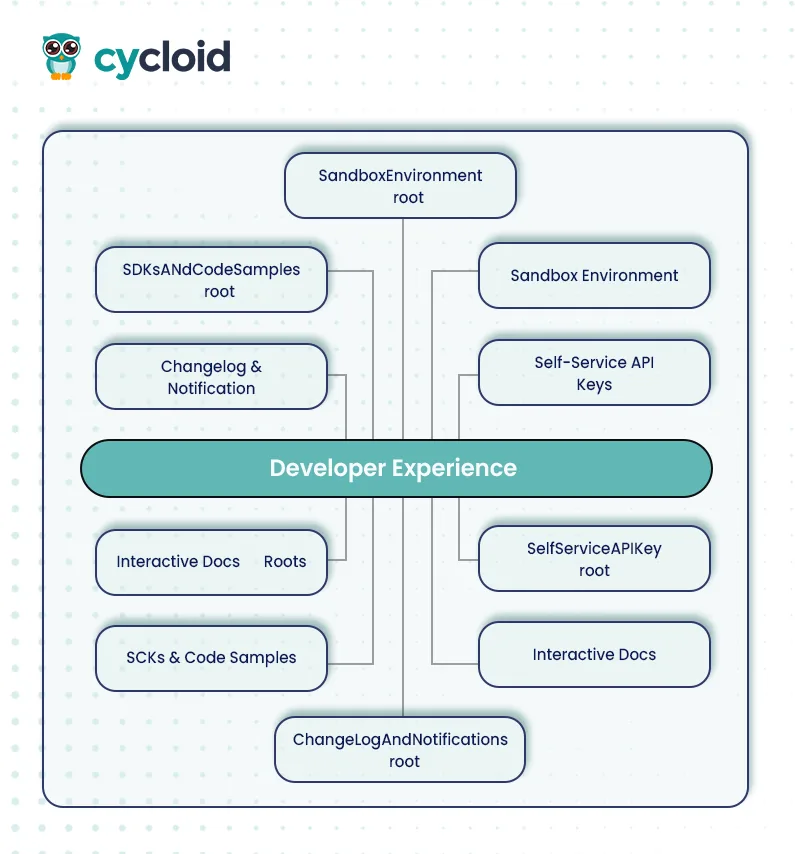
To turn Cycloid into an internal API developer portal, teams can follow this approach:
- Treat each API product as a Stack with spec, gateway configuration, policies, and tests.
- Use StackForms to collect API version, routes, quotas, and other metadata. Populate dynamic options using values_ref from the gateway API. Commit changes to Git to trigger automated CI/CD workflows.
- Surface OpenAPI documentation, usage/error charts, and access-request shortcuts via portal plug-ins that read metrics from the gateway or APM.
- Maintain access governance using Cycloid RBAC and SSO, while keeping API keys, quotas, and monetization in the APIM/gateway.
Integration with CI/CD pipelines ensures the portal stays current. Every code push can trigger automated generation of OpenAPI specs, version updates, and redeployment of documentation. This eliminates manual updates and prevents drift between code and portal information, ensuring developers always work with accurate and up-to-date resources.
Use Cases
Below are the few use cases and an analogy connected to get a better understanding:
1. API Onboarding: Reducing Developer Ramp-Up Time
An effective API developer portal minimizes the time it takes for developers to start using APIs productively. Traditional onboarding often involves scattered documentation, lack of standardized examples, and missing authentication guidelines, factors that slow down integration and lead to repeated support requests. A well-designed portal consolidates everything from API reference docs to quick-start guides and sample requests.
An API developer portal functions like a self-check-in kiosk at an airport. Instead of waiting for manual approvals or searching scattered documentation, developers can instantly find APIs, read usage guidelines, and request credentials. This dramatically cuts onboarding time by offering everything in one place, documentation, sample payloads, and sandbox environments.
For instance, SwaggerHub or Redocly portals can provide interactive “Try It Out” sections, allowing developers to test endpoints directly in the browser. These portals also support language-specific SDK generation, reducing manual setup. Combined with Backstage or Kong, API keys or OAuth tokens can be auto-provisioned through self-service workflows, further accelerating developer ramp-up.
2. Internal APIs: Enforcing Consistency and Visibility Across Teams
In microservices-driven environments, internal APIs often proliferate quickly. Without a centralized portal, teams risk duplicating efforts, misaligning API contracts, or introducing breaking changes. Developer portals address this by providing a shared interface for discovering APIs, tracking version histories, and enforcing schema consistency.
Think of internal APIs as city roads, where each road (API) must follow standard rules (naming conventions, authentication, versioning) to prevent accidents (service failures). A developer portal acts as a city traffic control center, providing clear maps, signposts, and policies so teams don’t accidentally break integration flows.
Backstage is particularly strong here, as it allows services and APIs to be registered in a unified catalog with metadata like ownership, lifecycle stage, and dependencies. Combined with CI/CD integrations, it can validate OpenAPI specifications or GraphQL schemas before deployment, ensuring adherence to standards across teams.
Example Scenarios
Setting Up an API Documentation Portal (Cycloid-centric)
Mental model: Treat the docs site as a Stack you can stamp out for each API. A StackForm captures parameters (spec location, version, visibility), a pipeline builds the docs and publishes a static site, and the Project gives teams a governed home with RBAC/SSO and visibility.
Step-by-Step
Step 1: Stack skeleton (docs as code)
- In your api-docs-stack repo, define the stack and inputs. Keep OpenAPI spec location configurable:
| # stacks/api-docs/stack.yml (excerpt) name: api-docs-stack description: Package & publish OpenAPI documentation as a static site inputs: – key: spec_repo_url type: string – key: spec_path type: string # e.g., openapi/openapi.json – key: spec_branch type: string # e.g., main – key: publish_bucket type: string # e.g., s3://company-api-docs |
- Expose those inputs via StackForm fields so producers don’t edit YAML directly:
# stacks/api-docs/.forms.yml (excerpt)
sections:
– title: “API Docs Source”
fields:
– name: “OpenAPI repository URL”
key: spec_repo_url
widget: text
– name: “Spec path”
key: spec_path
widget: text
– name: “Branch”
key: spec_branch
widget: text
– title: “Publication”
fields:
– name: “Static hosting bucket/endpoint”
key: publish_bucket
widget: text
Step 2: Pipeline to build & publish
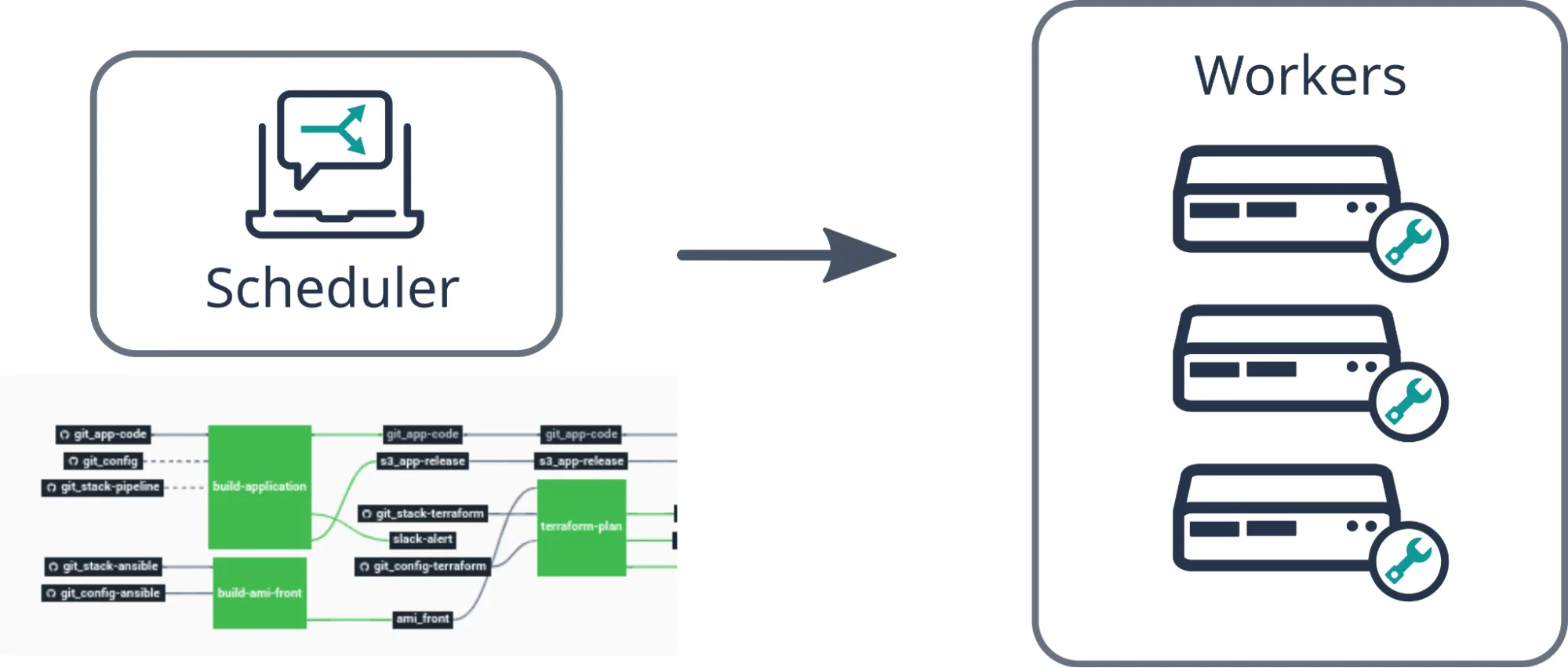
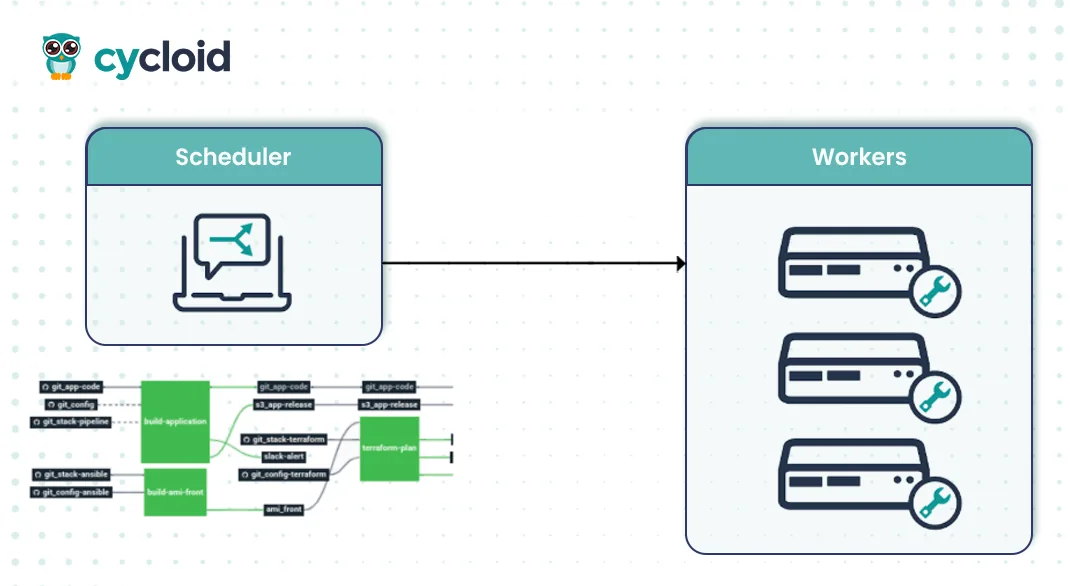
- Use Cycloid’s Concourse-based pipelines to fetch the spec, generate static docs (Redoc/Swagger UI), and upload to your static host (e.g., S3 or web bucket).
# pipelines/docs-publish.yml (simplified)
resources:
– name: spec-repo
type: git
source:
uri: ((spec_repo_url))
branch: ((spec_branch))jobs:
– name: build-and-publish-docs
plan:
– get: spec-repo
trigger: true
– task: build-docs
image: cycloid/cycloid-toolkit:latest
config:
platform: linux
inputs: [{ name: spec-repo }]
outputs: [{ name: site }]
run:
path: sh
args:
– -exc
– |
cd spec-repo
npx redoc-cli build ((spec_path)) -o ../site/index.html
– task: publish
image: cycloid/cycloid-toolkit:latest
config:
platform: linux
inputs: [{ name: site }]
params:
PUBLISH_BUCKET: ((publish_bucket))
run:
path: sh
args:
– -exc
– |
aws s3 sync site “${PUBLISH_BUCKET}” –deletePipelines in Cycloid can “build an application, create an infrastructure, [or] interact with monitoring tools,” and are Concourse-based. Use Cycloid workers near your target infra if needed.
Step 3: Surface in a governed Project
- Create a Project called payments-api and add an “API Docs” component referencing the published URL. Governance (RBAC/SSO) applies at org/project level so only intended audiences can see internal docs.
Step 4: Visibility & audits
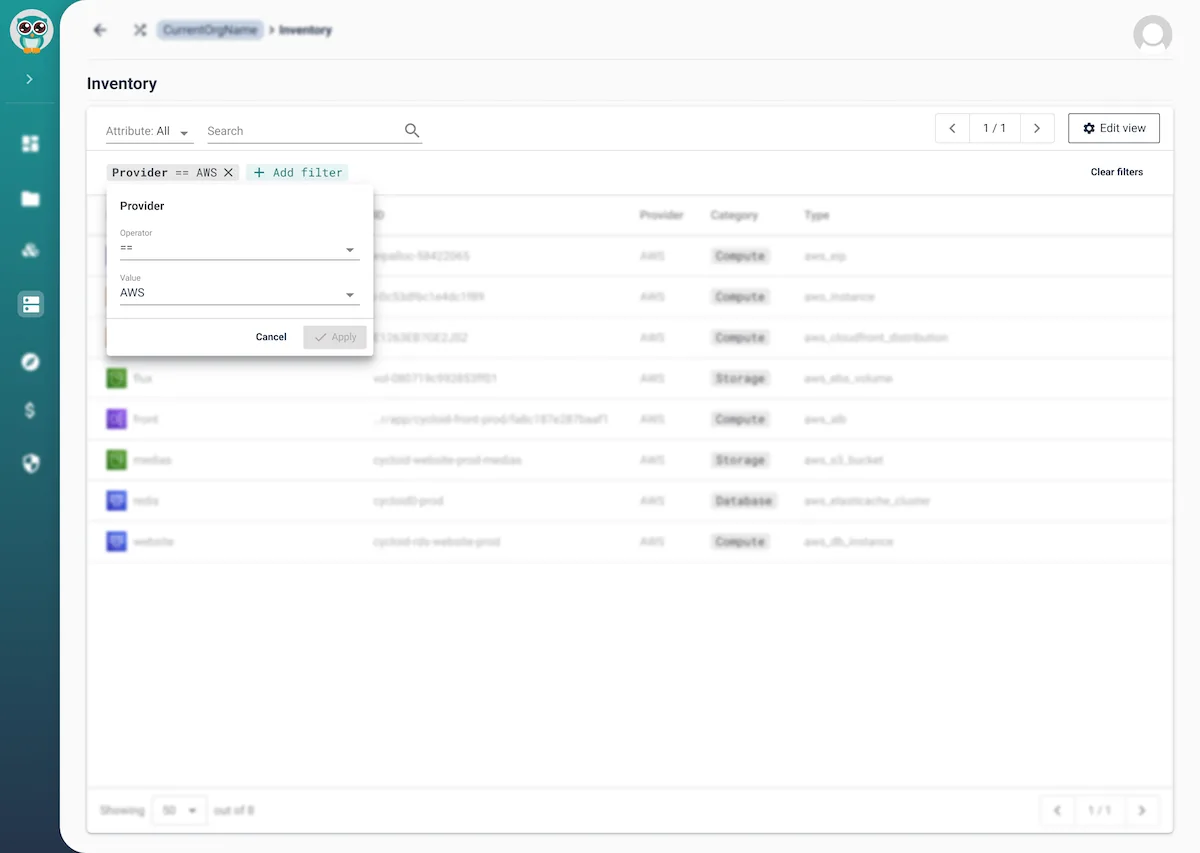
- Use Asset Inventory/InfraView to keep infra artifacts (bucket, CDN, delivery) visible and linked to the project; it reads IaC/state to draw an up-to-date map
Automating API Key Management (Cycloid-orchestrated, internal)
Cycloid captures access requests via StackForms, enforces RBAC/SSO and policy checks, and runs a pipeline that talks to your internal key service (or gateway admin API) to issue/rotate/revoke keys. Keys and events are then surfaced back in the Project for auditability.
Note: Cycloid does not natively issue consumer keys for your APIs; it automates the workflow through pipelines and its API/CLI. That’s the intended pattern for internal portals.
Walkthrough Overview
- Define a “Key Request” Stack with inputs (API name, environment, purpose, TTL).
- StackForm captures requester details; values_ref can pre-populate environment/API lists from an internal catalog endpoint.
- Pipeline validates the request against Infrapolicies (policy-as-code), then calls the internal key issuance API.
- Return key material to a controlled sink (e.g., secrets storage or notification) and record an event in the Project,
Step-by-Step
Step 1: Stack & StackForm for access requests
| # stacks/api-access/stack.yml (excerpt) name: api-access-stack inputs: – key: api_name type: string – key: environment type: string – key: consumer_email type: string – key: ttl_days type: number# stacks/api-access/.forms.yml (excerpt) sections: – title: “Request API Access” fields: – name: “API” key: api_name widget: text – name: “Environment” key: environment widget: select values_ref: url: https://internal.catalog.local/environments # dynamic options – name: “Your email” key: consumer_email widget: text – name: “TTL (days)” key: ttl_days widget: number |
StackForms exposes configuration through a guided UI; you can also drive dynamic choices via external APIs (the pattern is supported in StackForms).
Step 2: Policy gate (Infrapolicies)
- Before issuing a key, run a policy step that rejects disallowed environments or enforces TTL bounds:
| # pipelines/issue-key.yml (policy gate excerpt) – task: policy-check image: cycloid/cycloid-toolkit:latest config: platform: linux params: { REQUEST_FILE: request.json } run: path: sh args: – -exc – | # Example: invoke Cycloid Infrapolicies resource/validator here echo “Policy gate would run here (blocked if violates rules)” |
Cycloid’s Infrapolicies integrate directly in pipelines to fail or warn based on policy outcomes.
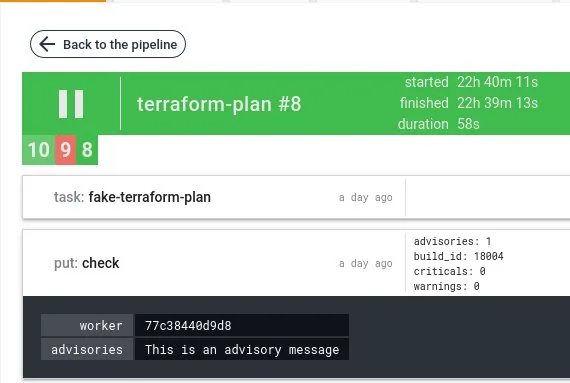
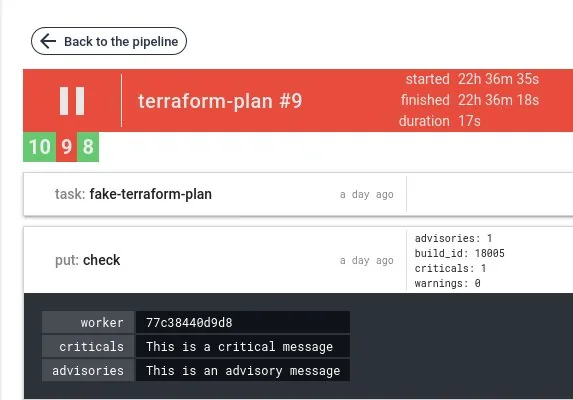
Example of output
Validation with advisories, the job is green and display advisories result as metadata:
Validation with criticals and/or warnings, the job fails and display result as metadata:
Step 3: Issue/rotate keys via pipeline task
- Use Cycloid’s toolkit container to curl your internal key service (or admin API). Pipelines are first-class in Cycloid and can call any HTTP API.
| – task: issue-key image: cycloid/cycloid-toolkit:latest config: platform: linux params: KEY_SVC_URL: ((key_service_url)) AUTH_TOKEN: ((key_service_token)) run: path: sh args: – -exc – | payload='{“api”:”((api_name))”,”env”:”((environment))”,”email”:”((consumer_email))”,”ttl”:((ttl_days))}’ resp=$(curl -sS -H “Authorization: Bearer ${AUTH_TOKEN}” \ -H “Content-Type: application/json” \ -d “${payload}” “${KEY_SVC_URL}/issue”) echo “${resp}” > key.json jq -r .key_id key.json |
If your key service is on a private network, deploy a Cycloid worker close to it; workers initiate outbound connections and simplify network access.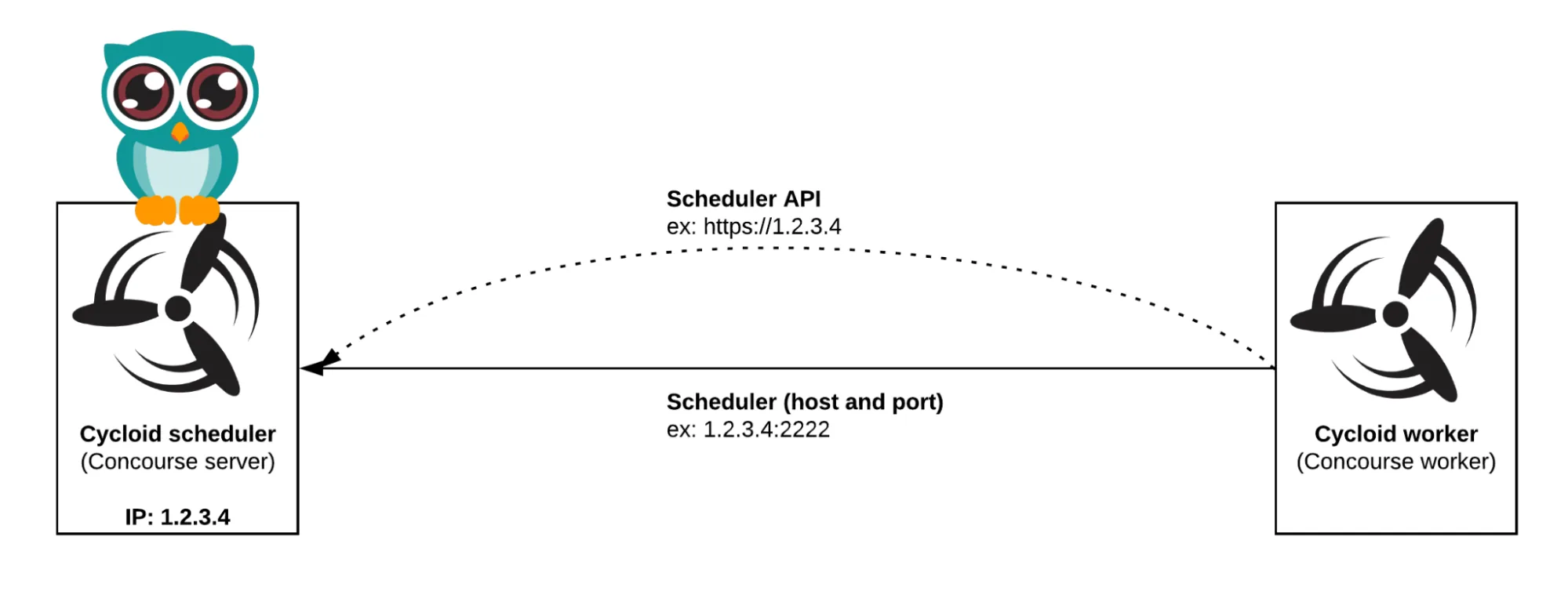
Step 4: Return & audit
- Notify the requester and update the Project record:
| – task: notify-and-record image: cycloid/cycloid-toolkit:latest config: platform: linux inputs: [{ name: . }] run: path: sh args: – -exc – | key=$(jq -r .key key.json) # Example: send email/Chat and post event to Cycloid (via API/CLI) cy –org my-org project event create \ –project my-api —type “access-granted” \ –message “Key issued to ((consumer_email)) for ((api_name))” |
Anything you can do in the web console is automatable via the Cycloid API/CLI, and events live with the Project for traceability.
Step 5: Rotation & revocation
- Reuse the same pipeline with different tasks (/rotate, /revoke) on a schedule or on demand; enforce maximum TTL via the policy step.
Operational visibility
- Use InfraView and Asset Inventory to show the infra components that back your key service (buckets, functions, gateways) so platform and security teams share the same map.
Cycloid as a Foundation for API Developer Portals
Cycloid functions as an Internal Developer Platform (IDP) that can serve as a solid foundation for building API developer portals. While not a dedicated API gateway or documentation tool, its modular components can be assembled to support API lifecycle management, onboarding, and governance within a self-service interface.
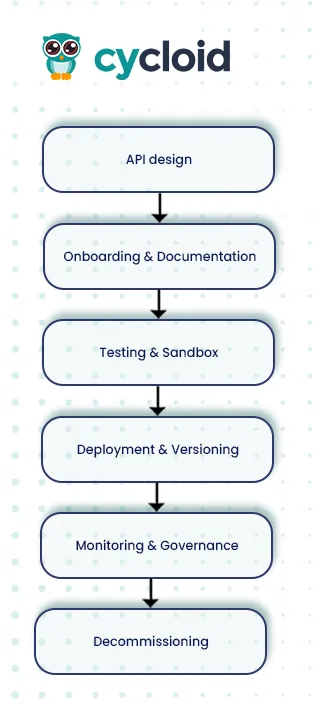
Key Features Relevant to API Portals
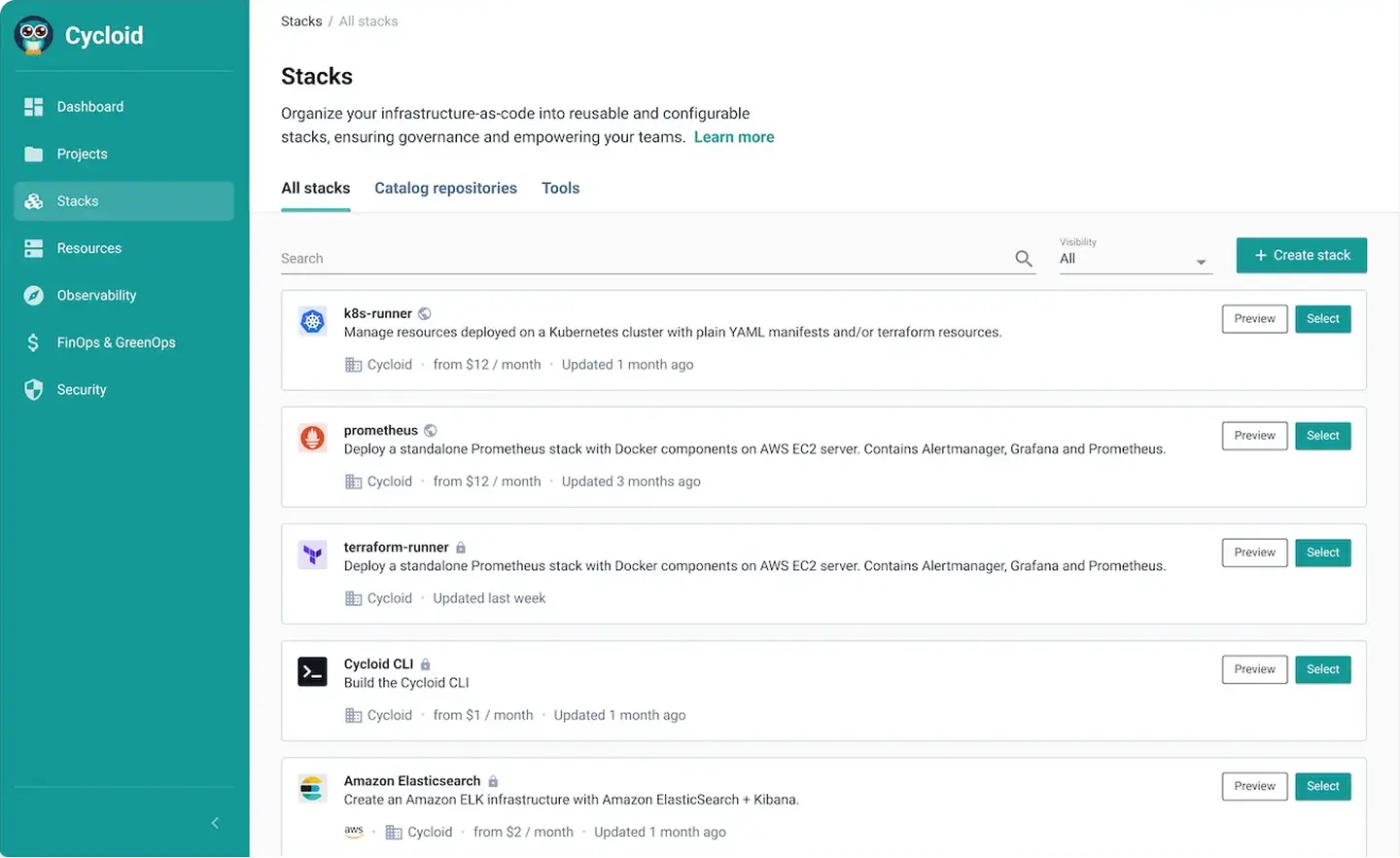
- Stacks & StackForms – Provide reusable templates (Stacks) and user-friendly forms (StackForms) to model and provision API-related infrastructure with safe parameters and configuration validation.
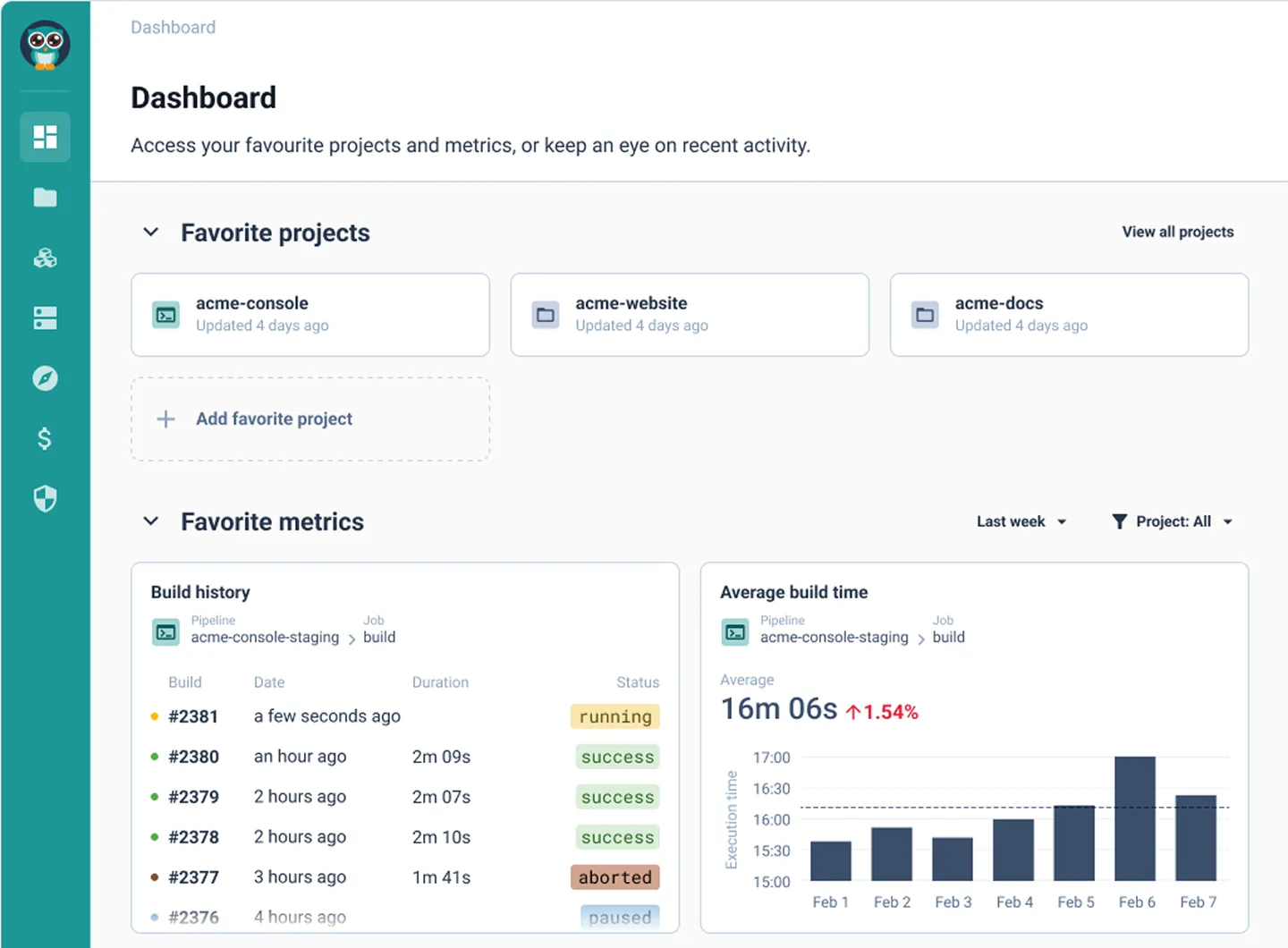
- CI/CD Pipelines – Automate end-to-end processes from documentation publishing to API deployment in a GitOps-friendly workflow.
- Service Catalog & InfraView – Catalog and visualize API infrastructure alongside other resources, offering clarity and transparency across teams.
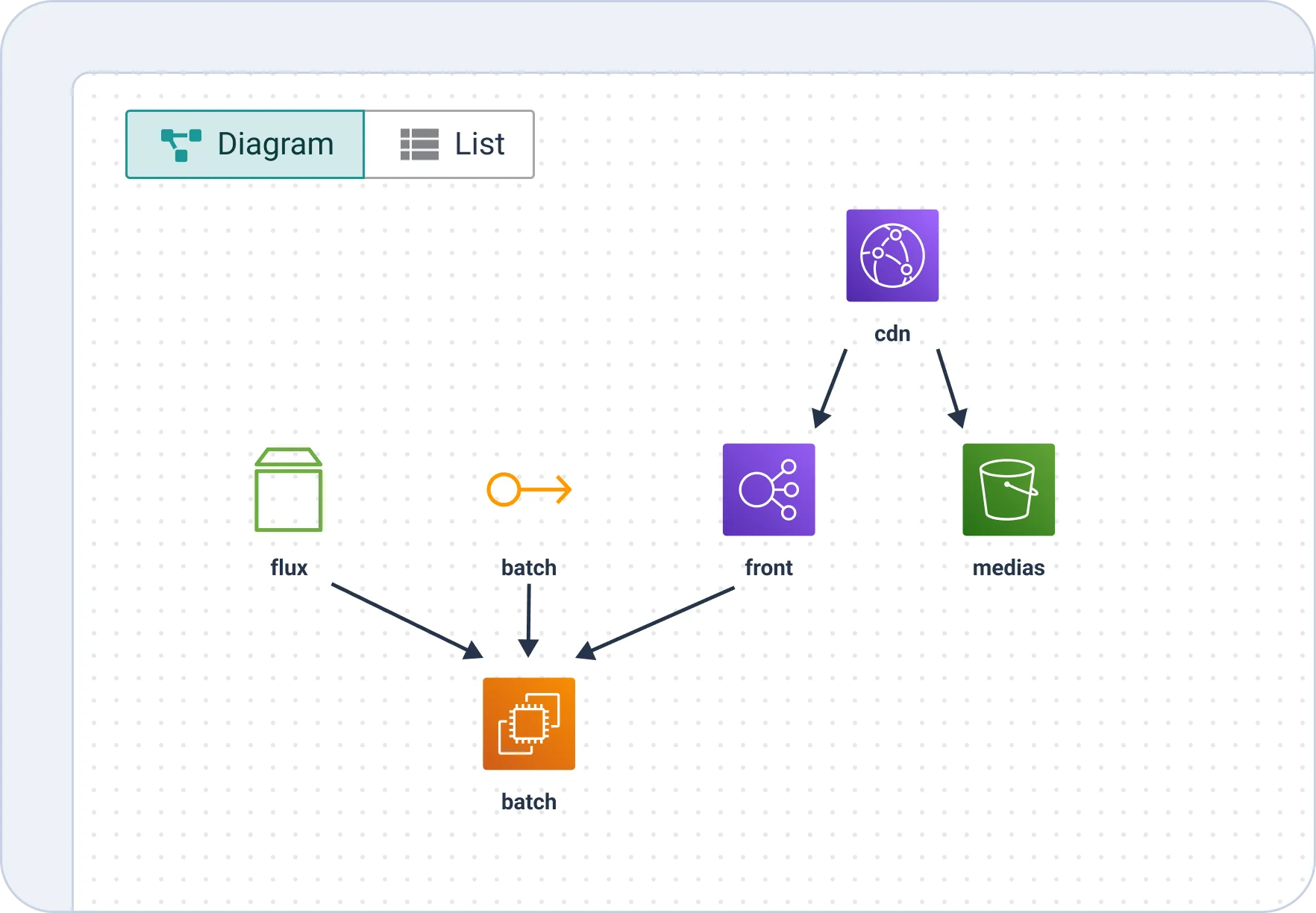
Flow
- Flux triggers batch – Code or data from Flux moves into a batch processing workflow.
- Batch executes – Processing tasks occur before deployment or data transformation.
- Front serves – Processed content or applications are pushed to the frontend.
- CDN and Media storage integration –
- Frontend connects to a CDN for caching and faster delivery.
- Media storage (e.g., static files, videos) is also linked to the CDN for optimized delivery.
- Governance & Policies – Built-in RBAC, SSO support, and policy-as-code via Infrapolicies enable secure, compliant operations at scale.
Conclusion
API developer portals are more than documentation sites, they are gateways for discovery, access, testing, and lifecycle management of APIs. They reduce onboarding friction, enforce governance, and improve adoption for both internal and external audiences. While Cycloid isn’t a turnkey API management portal, it provides strong internal developer platform capabilities that can be extended into an API portal when paired with a gateway like Kong, Apigee, or Azure APIM.
FAQs
What are API portals?
API portals are developer-facing platforms that centralize API documentation, authentication, access controls, and usage analytics in one interface. They let developers discover available APIs, request access credentials, test endpoints, and monitor consumption – without relying on the platform team for each step. API portals come in two forms: external portals (exposing product APIs to third-party developers) and internal portals (exposing infrastructure and automation APIs to an organization’s own engineering teams).
What is the difference between an API portal and an API gateway?
An API gateway operates at the network layer – it routes requests, enforces rate limits, handles authentication tokens, and manages traffic between clients and backend services. An API portal is the developer-facing interface that sits on top of (or alongside) the gateway. The portal provides documentation, onboarding workflows, access request forms, and usage dashboards. In short: the gateway manages traffic; the portal manages the developer experience. Most production setups use both – a gateway like Kong or Apigee handling runtime traffic, and a portal layer handling discovery and self-service.
What are the best internal API portal tools in 2026?
For internal API portals – where the goal is giving engineering teams self-service access to infrastructure and automation APIs – the leading options in 2026 are Cycloid (IDP-native, GitOps-first, with StackForms for self-service provisioning), Backstage (Spotify’s open-source developer portal with an API catalog plugin, though it requires significant DIY effort to reach production), and Kong Konnect (primarily an external API gateway but usable for internal APIs via Insomnia and the developer portal module). The right choice depends on whether your APIs are infrastructure-facing (Cycloid) or service-catalog-focused (Backstage).
How do you build a self-service API portal?
Start by defining each API product as a reusable template. In Cycloid, this means a Stack with its spec, gateway configuration, and access policies. Build a self-service form (StackForms in Cycloid, or software templates in Backstage) that lets developers request API access, select environments, and configure parameters without editing YAML directly. Connect the form to a CI/CD pipeline that validates requests against governance policies, provisions access credentials, and publishes updated documentation automatically. Add RBAC and SSO so access is scoped to the right teams. The result is a portal where developers can find, request, and start using APIs without a single ticket to the platform team.
Check our Comparisons: Cycloid vs Backstage / Cycloid vs Compass / Cycloid vs Humanitec / Cycloid vs Port