







Fine-grained authorisation
Four gates. Every action.
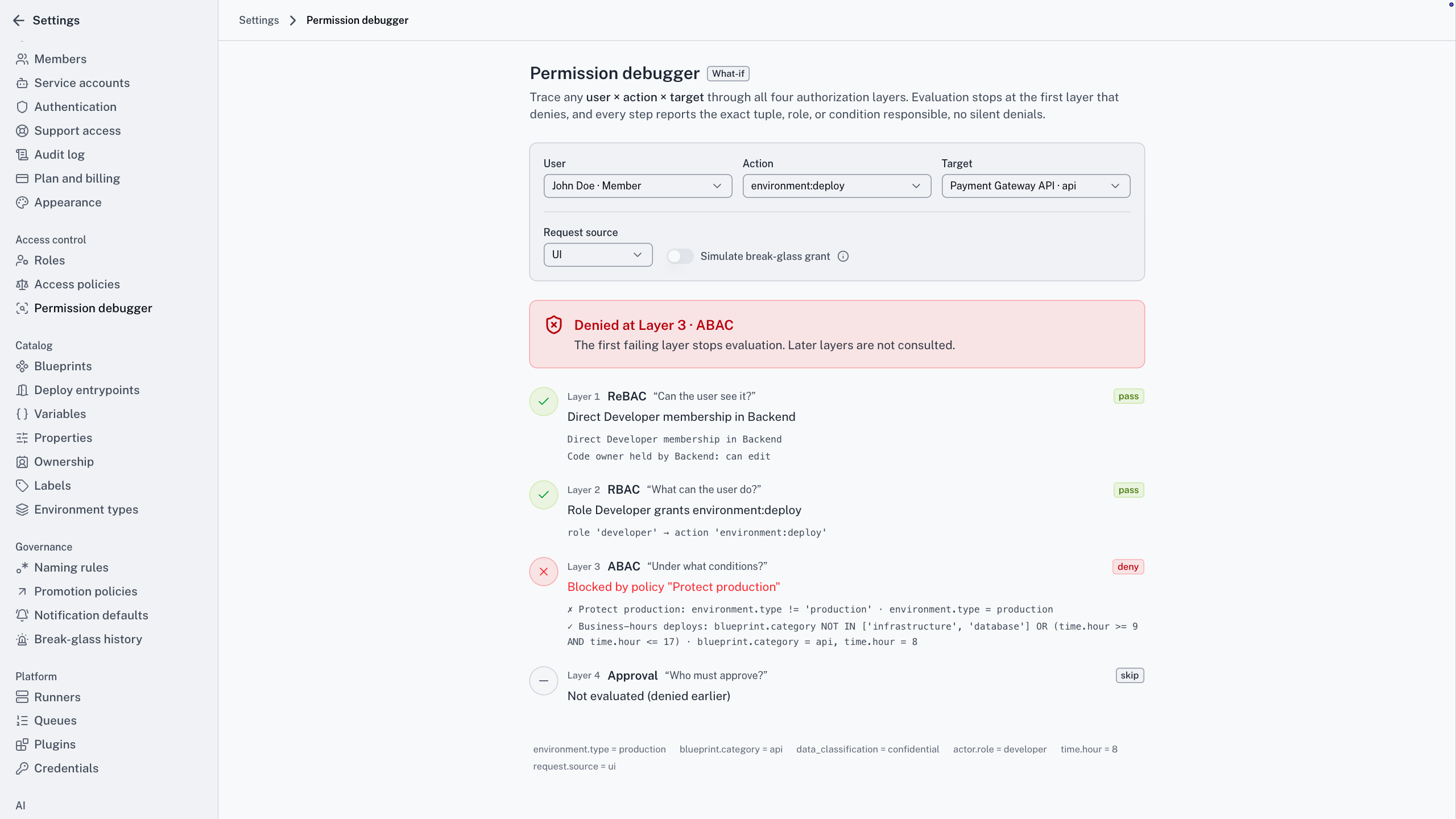
One coarse role for everyone is how over-permissioning happens. Your platform team sets the guardrails once, and every action passes four gates, for a person or an AI assistant.
Visibility and roles come with every plan. Conditions and approvals are part of Enterprise.
One action, four gates
The gap
What fine-grained authorisation actually means
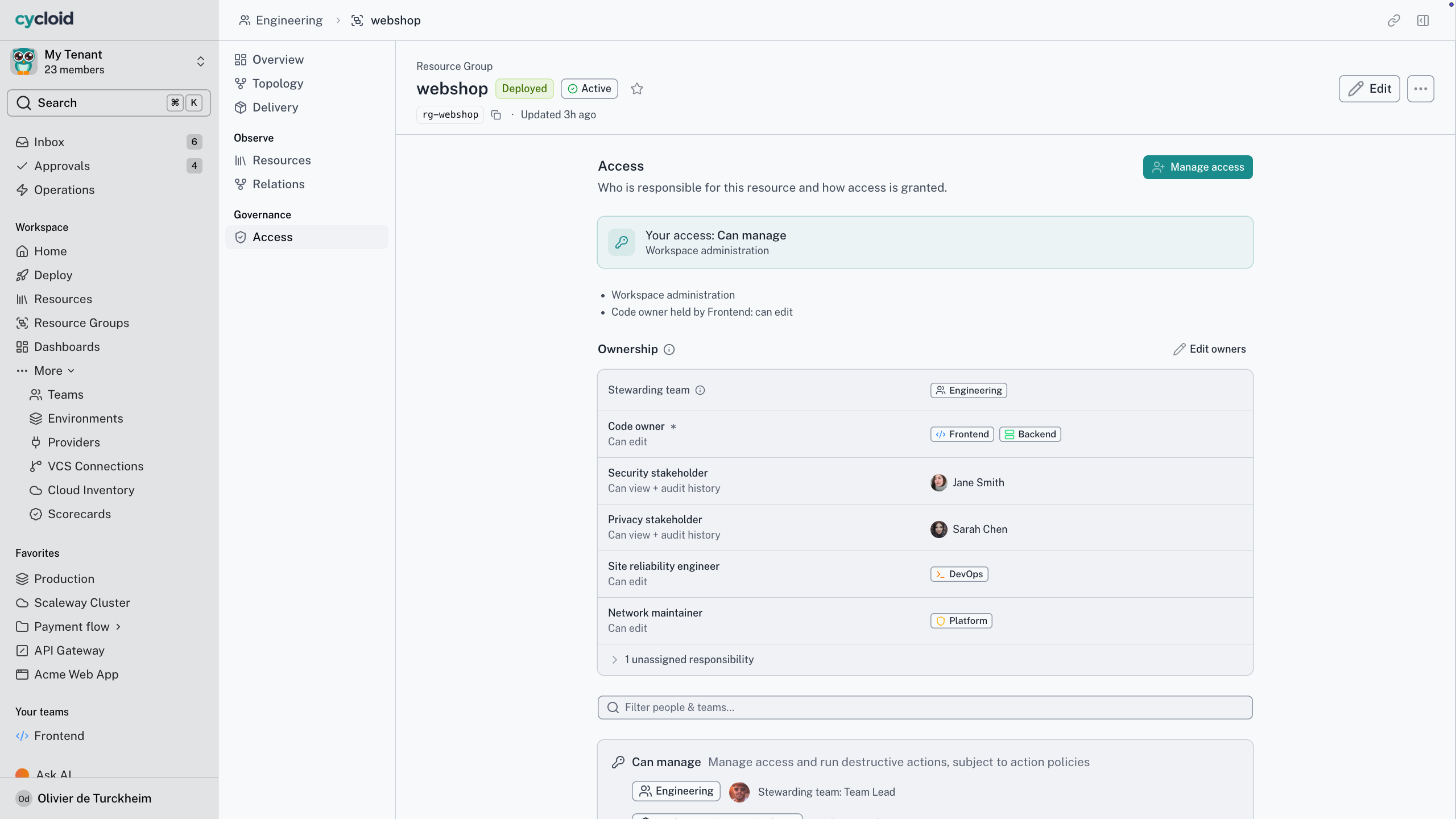
Most platforms authorise at the org level. A handful of broad roles, and everyone lands in one of them. It’s quick to set up and impossible to govern. Cycloid draws the line per action and per resource, so a permission means one specific thing. That’s the difference between a role you can explain and a role you hope nobody tests.
Cycloid for your team
What four layers change for your team
Grant exactly what
the job needs
The problem
Broad roles you widen once and never tighten.
With Cycloid
Visibility, action, condition and approval set independently.
The outcome
A permission you can explain in one sentence.
See only what's yours,
act only where you should
The problem
Either locked out, or handed the keys to everything.
With Cycloid
Exactly the resources and actions your role and relationships allow.
The outcome
No ticket to see your own estate, no path to break someone else’s.
An access model that
survives an audit
The problem
“Who can do what” has no clean answer.
With Cycloid
Four named layers, one chain, the same for people and assistants.
The outcome
Least privilege you can actually demonstrate.
How it works
How the four checks work
01 · ReBAC, can I see it?
Visibility comes from ownership and team relationships. A resource you have no relationship to isn’t in a list, a search or an API response.
02 · RBAC, what can I do?
Your role maps to a fixed set of actions per resource type. A Member can’t destroy an environment, whatever they own.
03 · ABAC, under what conditions?
Tenant rules narrow a granted action, say to non-production or business hours. ABAC can tighten a role and never widen one.
04 · Approval, who signs off?
If an approval rule matches, the action waits for the right people. Approval workflows covers it in full.
05 · Then it checks again
The chain runs again at execution. If a role was revoked while the request waited, the approved action fails and names the layer.
Authority can split across one resource. Ops runs it, security approves the risky changes, and whoever holds the DBA field approves schema changes, with no team ID hard-coded anywhere.
For architects. Visibility and actions are answered by OpenFGA, from relationship tuples. Conditions run in the application as a restrict-only filter. Tenant isolation is a separate wall: tenant checks and Postgres row-level security sit underneath all four layers, and OpenFGA isn’t what separates tenants. Every operation is one named action, such as environment:destroy.
How the four checks work
The short version
The rules that never bend
4
layers on every action
2
checks: at submit, and again at run time
1
named action per operation. No blanket grants
0
ways a condition can widen access
Destroy the staging database.

I can see it, but this stops at the action layer. Your role has deploy on staging, not destroy, so I can’t run it either.
Check · environment:destroy
Denied · Layer 2 RBAC
Your role
Member: deploy, not destroy
Result
Denied, same as it would be for you
Working with your assistant
Same checks for you and your assistant
Does the assistant get its own permissions?
No. There’s no service account and no elevated assistant role. If you can’t deploy to production, neither can the assistant you’re talking to, in Cycloid’s own assistant or any compliant MCP host.
Your assistant runs the same chain you do. It sees what your relationships allow and does what your role permits, under the same conditions and behind the same approvals. There’s no fast lane and no second policy engine to keep in sync.
When a layer would stop you, it stops the assistant for the same reason. Anything you can’t see isn’t there for the assistant either, and it’s never listed as withheld.
Frequently asked questions
What's the difference between ReBAC, RBAC and ABAC?
ReBAC decides what you can see, from relationships. RBAC decides what you can do, from your role. ABAC decides under what conditions, and only ever restricts. All three run before any approval.
Do AI assistants get the same rules?
Yes, through the same code path. Every tool call lands in the same service layer as the portal and the API. A tenant can narrow assistants further, to read-only say, but never loosen them. See how the assistant works.
What powers it?
OpenFGA, the open-source take on Google’s Zanzibar, answers the visibility and action layers. ABAC runs in the application as a restrict-only filter, so a failed condition removes an action and never adds one.
Can we map our identity provider groups to roles?
Yes. A directory group maps to teams with a role on each. People in a mapped group are in from their first login, and SCIM 2.0 applies changes as your IdP pushes them. Org modelling and SSO covers the rest.
Watch one action pass all four checks
Bring an action you suspect is over-permissioned. In twenty minutes we’ll walk it through all four layers and show you exactly where it would stop.