
TL;DR
- An IDP provides a centralized, self-service interface that automates complex tasks, including infrastructure provisioning, CI/CD pipelines, testing, and deployments. This allows developers to focus on writing code and delivering features without worrying about managing servers, configurations, or environment setups.
- IDPs support Development, Staging, and Production environments, enabling teams to test new features safely in staging before deploying them to production. This ensures consistency, reduces errors, and maintains stability across all deployment stages.
- By centralizing control and using role-based access, IDPs scale efficiently for large teams and enterprises. They standardize workflows, simplify permission management, and allow developers and operations teams to collaborate effectively while maintaining security and compliance.
- IDPs like Cycloid supports leading Git-providers (e.g., GitHub, GitLab), CI/CD/automation tools (e.g., Jenkins), infrastructure-as-code frameworks (e.g., Terraform, Ansible) and is designed for multi-cloud environments (AWS, Azure, GCP and hybrid clouds)
What is an Internal Developer Platform?
An Internal Developer Platform (IDP) is a system that speeds up and simplifies software development by sitting between developers and the complex infrastructure behind their applications. It provides a self-service layer that lets developers build, test, and deploy software without worrying about setting up environments, pipelines, or configurations.
In simple terms, an IDP brings together all the tools, services, and workflows a team needs into one easy-to-use platform. It’s usually customized for each company, helping developers focus on writing code and delivering features while the platform handles the heavy lifting of deployment and management.
According to internaldeveloperplatform.org, modern engineering organizations like Spotify and Zalando have built IDPs to eliminate friction between developers and infrastructure.
For instance, Spotify’s open-source platform Backstage provides a single portal where teams can:
- Browse available services and templates in a service catalog
- Spin up new microservices using standardized blueprints
- View build pipelines, logs, and documentation in one place
Similarly, An IDP like Cycloid helps organizations:
- Accelerate delivery: Developers can deploy new services in minutes using pre-built templates.
- Ensure consistency: Every project adheres to security, cloud, and compliance standards automatically.
- Improve collaboration: Dev, Ops, and Security teams work on a single shared platform.
- Reduce cognitive load: Developers focus on feature logic — the platform handles infra, pipelines, and monitoring.
Features of Popular Internal Developer Platforms (IDPs)
Modern Internal Developer Platforms differ in scope and architecture, but they all share a goal making it easier for developers to ship software without worrying about infrastructure or pipeline complexity.
Below are two leading examples that illustrate how teams implement IDPs in practice.
Backstage
Backstage is an open-source platform created by Spotify for building developer portals. Its main focus is on improving developer productivity through centralization and standardization.
Backstage isn’t a deployment platform; it’s a framework for building your own developer portal.
It’s essentially a React + Node.js monorepo that centralizes your organization’s software components and operational data through a plugin model.
Key Developer-Level Features
Software Catalog (YAML-Driven Source of Truth):
Each service, library, or data pipeline inside Backstage is registered via a catalog-info.yaml file that defines ownership, lifecycle, system relationships, and links to its Git repo and CI/CD pipeline.
| apiVersion: backstage.io/v1alpha1 kind: Component metadata: name: payments-service owner: team-frontend lifecycle: production spec: type: service providesApis: – payments-api |
Backstage parses these YAMLs and builds a real-time catalog of all components across teams.
- Scaffolder Templates (“Golden Paths”):
Teams can bootstrap new services using reusable YAML templates (template.yaml).
Templates can scaffold a new Git repo, provision CI pipelines, apply IaC configs, and open PRs — automating 90% of the boilerplate setup.
| steps: – id: fetch-base action: fetch:template input: url: ./template |
This makes service creation consistent and policy-compliant across the org.
- Plugin Architecture:
Everything in Backstage (CI integrations, monitoring panels, docs, Kubernetes views) is implemented as a plugin, either community-built or custom.
For example: @backstage/plugin-kubernetes fetches pod status from clusters via the Kubernetes API and shows it inside the portal. - TechDocs:
Converts Markdown/MDX inside your repos into a live documentation portal using MkDocs.
Docs live beside your code and are automatically rebuilt through CI. - Kubernetes & Observability Plugins:
Plugins like @backstage/plugin-kubernetes, @backstage/plugin-grafana, and @backstage/plugin-prometheus give a live operational view — logs, pods, metrics — inside the same portal where services are registered.
Qovery
Qovery is more opinionated; it’s a PaaS-like Internal Developer Platform built on top of Kubernetes and AWS primitives, abstracting away Terraform, Helm, and cluster configuration from developers.
Key Developer-Level Features
- Git-Based Deployment Model:
Developers push to Git (GitHub/GitLab/Bitbucket); Qovery listens via webhooks, builds the container, runs tests, and deploys to a managed Kubernetes cluster automatically.
Config is handled declaratively through a qovery.yml file in each repo:
| application: name: payments-api project: ecommerce port: 8080 build_mode: docker databases: – name: postgres type: postgresql version: “14” |
-
Ephemeral Environments (Preview Apps):
For every pull request, Qovery can spin up a temporary environment (Kubernetes namespace + DB clone), making feature testing fully isolated and automatic. -
Multi-Cloud Deployment via Infrastructure Abstraction:
Qovery supports AWS, GCP, Azure — but developers never touch Terraform or Helm. The platform dynamically provisions clusters and load balancers using its control plane. -
Built-in CI/CD and Rollbacks:
Qovery orchestrates build and deploy pipelines itself. For existing setups, it integrates with GitHub Actions, GitLab CI, and Jenkins through API hooks. -
Secrets, Databases, and Add-ons as First-Class Resources:
Developers can attach Postgres, Redis, RabbitMQ, and manage credentials through the same YAML file, versioned in Git. -
Kubernetes-Native Observability: Provides application metrics and container logs directly from Qovery’s dashboard (powered by Kubernetes metrics-server and Loki).
Understanding Internal Developer Platforms (IDPs) and Their Purpose
An Internal Developer Platform (IDP) is a self-service system within a company that enables developers to build, deploy, and manage applications without managing complex infrastructure, deployment pipelines, or environment configurations.
Purpose of an IDP
The purpose of an Internal Developer Platform (IDP) is derived from its key goals, as reflected in industry practices and real-world implementations:
- Simplify development: Developers can focus on writing code without worrying about infrastructure setup.
- Reduce errors: Standardized workflows and automation minimize mistakes during deployment.
- Standardize workflows: Ensures consistency across teams when deploying and managing applications.
- Enable faster delivery: Developers can release new features quickly without depending heavily on DevOps support.
- Increase productivity: Self-service capabilities save time and reduce manual effort.
- Support scalability: Automatically manages infrastructure scaling to handle growing applications.
How does an internal developer platform work?
In this section, we will examine the key components and features of Internal Developer Platforms (IDPs). Developers interact with the IDP through portals, APIs, or CLI tools to deploy applications, manage environments, and provision resources without requiring deep knowledge of the underlying infrastructure. The IDP streamlines and automates essential workflows, including CI/CD pipelines, infrastructure provisioning (often using Terraform or Kubernetes), secrets management, and system monitoring.
The diagram below illustrates the architecture and processes that power an IDP, lets also try to understand the flow:
- Developers push code to a version control system such as GitHub, GitLab, or Bitbucket.
This commit often includes an application manifest (deployment.yaml, values.yaml, or Terraform variables) that describes how the app should run. - The IDP detects the change through a webhook or automation pipeline and triggers a CI/CD process (Jenkins, GitLab CI, or Cycloid’s own pipelines).
The pipeline builds the container image, runs tests, and pushes artifacts to a registry (ECR, GCR, or Docker Hub). - Platform orchestrators inside the IDP often powered by Terraform, Ansible, or Helm then provision and update infrastructure. This might involve creating Kubernetes namespaces, load balancers, or managed databases.
- Secrets, policies, and environment configuration are automatically injected through the platform’s configuration management layer, ensuring every environment (Dev, Staging, Prod) remains consistent.
- Monitoring and cost visibility modules collect logs, metrics, and resource data to provide real-time feedback loops for developers and SREs.

The main components of the IDP include:
- Self-service developer portal
- Automated workflows and integration with existing systems
- Infrastructure management
- Environment management and application configuration
Self-Service Developer Portal
In the previous section, we looked at how an Internal Developer Platform connects developers, CI/CD systems, and infrastructure.
At the heart of that flow is the developer portal, the main entry point where developers interact with the platform.
A self-service developer portal abstracts away infrastructure complexity by providing an interface (UI or CLI) that allows developers to:
- Provision and manage environments,
- Deploy or roll back applications
- Access logs, metrics, and secrets,
- And trigger automated workflows all without requiring deep infrastructure knowledge.
How It Fits Into the IDP Architecture
When a developer pushes code to a repository, the portal acts as the front-end gateway to the IDP.
Behind the scenes, it connects to the platform orchestrator (Terraform, Ansible, or Cycloid pipelines) that manages infrastructure provisioning, pipelines, and secrets.
This layer also exposes service catalogs a structured view of everything running inside the platform.
Each service entry (often defined via YAML or metadata files) shows:
- Ownership and dependencies,
- Deployment environments (Dev, Staging, Prod),
- Git and pipeline integrations, and
- Monitoring dashboards.
For example In Cycloid, the developer portal surfaces StackForms, where developers can self-service predefined blueprints for infrastructure or applications. Each StackForm maps directly to Terraform modules, ensuring consistent configuration across environments.
Automated Workflows and Integration with Existing Systems
IDPs utilize automation to simplify and accelerate processes such as code testing, building, deployment, and monitoring. Implementing an IDP helps maintain consistency and minimizes the risk of human errors.
Since IDPs do not operate in isolation, they need to integrate with existing tools and systems. Effective integration and automation are crucial when building an IDP on top of an established infrastructure.
Infrastructure management
An IDP connects existing Continuous Integration (CI) pipelines with cloud or on-premise infrastructure, reducing manual effort and minimizing errors in managing application environments.
A critical component of this setup is an Infrastructure as Code (IaC) tool, such as Terraform, OpenTofu, Pulumi, or Crossplane. The IDP provides developers with predefined templates to outline the infrastructure they need at a high level, while the underlying orchestration generates the necessary IaC manifests and automatically deploys the corresponding changes.
Environment management and application configuration
IDPs encourage the use of standardized development, testing, and production environments to ensure consistency and minimize compatibility issues across teams and projects. Additionally, they speed up the provisioning of new environments and eliminate bottlenecks through self-service and on-demand models.
Deployment management and monitoring
A key aspect of an IDP is its integration with Continuous Delivery (CD) pipelines, which automates testing and deployment processes. New code is automatically promoted from testing to staging environments, with the necessary tests executed along the way. Because IDPs integrate with other systems, they often trigger additional workflows or communicate with external tools during and after deployments.
Moreover, IDPs provide a unified monitoring view and detailed debugging information, including deployment and application logs, to help resolve errors. In the event of deployment failures, the platform typically supports automated rollbacks and mitigation strategies.
Difference between an IDP and DevOps
While both IDPs and DevOps aim to streamline software delivery, they serve different purposes. An IDP is a platform that provides developers with self-service tools and automated workflows, whereas DevOps is a cultural and methodological approach that emphasizes collaboration between development and operations teams. The table below highlights the key differences between the two.
| Aspect | Internal Developer Platform(IDP) | DevOps |
| Definition | A self-service platform that allows developers to build, deploy, and manage applications without handling infrastructure manually. | A set of practices and culture that combines software development (Dev) and IT operations (Ops) to deliver software faster and more reliably. |
| Focus | We are simplifying developer workflows and automating infrastructure usage. | Improving collaboration between development and operations teams, and automating the software lifecycle. |
| Scope | Primarily developer-facing; focuses on providing tools and automation for deployment and management. | Broader; includes cultural, procedural, and technical practices across development and operations. |
| User | Developers use the platform directly to deploy/manage applications. | Development and Operations teams implement DevOps practices together. |
| Goal | Increase developer productivity, reduce errors, and standardize workflows. | Increase collaboration, speed, and reliability of software delivery. |
| Example | Amazon’s internal platform lets developers deploy new services with a click. | Implementing CI/CD pipelines, infrastructure as code, and monitoring systems in a company. |
Why Modern Businesses Are Adopting Internal Developer Platforms
Modern businesses are adopting Internal Developer Platforms (IDPs) to accelerate software development, deployment, and scaling while reducing complexity and costs. As organizations grow, managing infrastructure, environments, and deployment processes manually becomes time-consuming and error-prone. An IDP provides a centralized, automated, and self-service system that solves these challenges by simplifying how developers interact with infrastructure.
Here are the main reasons why companies are shifting toward IDPs:
- Faster Software Delivery IDPs automate deployments and environment setups, allowing developers to release new features quickly without waiting for DevOps teams.
- Improved Developer Productivity: Developers can focus on coding and innovation rather than on infrastructure or configuration tasks.
- Reduced Operational Complexity: IDPs hide the complexity of cloud resources, CI/CD pipelines, and container orchestration behind a simple interface.
- Consistency and Standardization: IDPs enforce standardized deployment processes, ensuring that applications run consistently across development, testing, and production environments.
- Better Collaboration Between Teams: By providing a shared platform, IDPs bridge the gap between developers and operations teams, reducing friction and communication gaps.
- Cost Efficiency: Automation reduces the need for repetitive manual tasks, saving time, resources, and infrastructure costs.
Example: A company like Netflix or Shopify releases updates daily. Without an IDP, managing hundreds of microservices would require a huge DevOps effort. With an IDP, developers can deploy and monitor their services through a single interface, ensuring faster delivery, higher reliability, and better team productivity.
Features of Internal Developer Platforms

An Internal Developer Platform (IDP) provides a unified system that simplifies software development, deployment, and management. It combines tools, automation, and best practices to enhance developer experience and operational efficiency.
Self-Service Capabilities
An IDP enables developers to perform common tasks — such as building, testing, and deploying applications — without relying on DevOps or infrastructure teams. This self-service model speeds up development cycles and helps teams deliver new features faster.
Environment Management
IDPs automate the creation and configuration of development, testing, and production environments. This ensures that all environments are consistent, reducing “it works on my machine” problems and improving deployment reliability.
CI/CD Automation
Continuous Integration and Continuous Deployment (CI/CD) pipelines are integrated into IDPs to automatically build, test, and deploy code changes. This automation minimizes manual work, reduces human error, and ensures faster software delivery.
Infrastructure Abstraction
Developers don’t need to deal with complex cloud configurations, networking, or server management. The platform abstracts these layers, allowing developers to focus on writing quality code rather than managing infrastructure.
Observability and Monitoring
IDPs include tools for real-time logging, performance tracking, and alerting. This helps teams monitor application health, quickly detect issues, and maintain high system reliability.
Security and Compliance Controls
Built-in security features ensure that all code deployments comply with company policies and compliance standards. This protects applications from vulnerabilities and helps organizations meet legal or regulatory requirements.
Role-Based Access Controls(RBAC)
With RBAC, organizations can define user roles and permissions. Developers, testers, and admins each have access only to what they need, improving both security and accountability.
Scalability and Resource Management
An IDP automatically scales resources up or down based on demand. This ensures applications run smoothly during traffic spikes and saves costs when demand is low.
Integration with Existing Tools
Modern IDPs connect seamlessly with tools like GitHub, Jenkins, Kubernetes, and cloud providers such as AWS and Azure. This integration makes adoption easy without changing existing workflows.
Standardized Workflows
IDPs enforce uniform practices for building, testing, and deploying software across all teams. This reduces confusion, improves collaboration, and ensures consistent quality across the organization.
When do you need an Internal Developer Platform?
There’s no strict rule for when a company should adopt an IDP, but certain signs indicate it’s the right time, typically when your software development process becomes complex and requires coordination, efficiency, and standardization.
- Streamlined Development and Operations: If your teams spend too much time managing infrastructure, environments, or deployments, an IDP can centralize these tasks. This reduces manual work and allows developers to work independently, improving overall productivity.
- Faster Delivery: When release cycles are slow due to manual CI/CD, environment setup, or deployment processes, an IDP automates these tasks. This accelerates software delivery, enabling faster feature releases and updates.
- Standardized Tools and Security: As organizations grow, tools and workflows often become fragmented. An IDP unifies these tools, enforces standardized workflows, and ensures security and compliance, which reduces errors and operational risks.
- Efficient Onboarding: For teams growing rapidly, onboarding new developers can be time-consuming. IDPs provide standardized templates, workflows, and environments, making it easier for new developers to get productive quickly.
How IDPs Empower Platform Engineering
Internal Developer Platforms (IDPs) help platform engineering teams work smarter, not harder. Instead of spending time on repetitive tasks such as setting up environments or resolving deployment issues, platform engineers can focus on building tools and systems that make the entire organization more productive.
- Automation of Repetitive Tasks: IDPs automatically handle tasks such as environment setup, deployment pipelines, and CI/CD processes. This saves platform engineers from repetitive manual work and ensures everything works consistently.
- Standardization Across Teams: With an IDP, platform engineers can create templates and best practices that all development teams follow. This reduces errors, enhances software reliability, and makes it easier to maintain and scale systems.
- Better Developer Experience: Developers get a self-service interface for deploying applications, accessing environments, and monitoring performance. This reduces dependency on platform teams and speeds up development.
- Focus on High-Value Work: Since the IDP handles routine operations, platform engineers can spend more time on strategic work, such as improving infrastructure, building internal tools, and making systems more efficient and reliable.
- Improved Visibility and Governance: IDPs centralize monitoring, security policies, and compliance checks. Platform engineers can monitor all applications to ensure standards are being followed without micromanaging each team.
Example: Automating Deployment with Cycloid (YAML)
- The following code demonstrates the automation deployment of the program with Cycloid.

Top Business and Technical Benefits of Using an IDP
- Faster Time-to-Market: IDPs automate deployments, environment setups, and CI/CD pipelines, allowing teams to release new features quickly. Example: A company like Netflix can roll out updates or new features to millions of users faster because developers don’t have to wait for manual infrastructure setup.
- Improved Developer Productivity: Developers focus on writing code rather than managing servers or configurations, reducing bottlenecks and accelerating feature development. Example: At Shopify, engineers spend more time building e-commerce tools and less time on repetitive deployment tasks.
- Cost Efficiency: IDPs provide visibility into cloud usage and can automatically clean up unused environments, saving resources and reducing unnecessary cloud costs. Example: A startup using AWS can track resource usage per team and avoid paying for idle servers.
- Simplified Onboarding: Standardized templates, workflows, and automated environments help new developers become productive quickly.Example: At Spotify, new developers can start deploying services within days instead of weeks thanks to standardized IDP workflows.
- Better Collaboration and Accountability: By centralizing processes and providing dashboards, IDPs give visibility into deployments, costs, and performance, improving communication and accountability across teams. Example: At large organizations like Amazon, teams can track releases and resource usage transparently, reducing errors and improving coordination.
Getting Started with Integrated Developer Platforms
- Assess Your Needs: Identify the challenges in your development workflow, such as slow deployments, inconsistent environments, or manual operations. Understanding these pain points will help you leverage the platform effectively.
- Start Small with a Pilot Project: Begin using Cycloid for a single application or service. This allows your team to familiarize themselves with the platform, test automation workflows, and see productivity improvements without affecting all projects.
- Automate Workflows Gradually: Set up automated CI/CD pipelines, environment provisioning, and deployment workflows. Start with the most repetitive or time-consuming tasks to gain quick benefits.
- Implement Standardization and Best Practices: Create templates, standardized workflows, and governance rules for deployments, security, and monitoring. This ensures consistency and reduces errors across teams.
- Measure, Iterate, and Scale: Monitor metrics like deployment speed, developer productivity, and resource usage. Gather feedback from your team to continuously improve processes. Once successful, expand Cycloid usage across multiple teams and projects.
Best practices for selecting an internal developer platform
- Align the Platform with Organizational Needs: Before selecting an IDP, ensure it aligns with your organization’s workflows, technology stack, and deployment models, whether cloud, on-premises, or hybrid. The platform should address the specific requirements of your development and operations teams to avoid future bottlenecks.
- Evaluate Automation Capabilities: Look for a platform that supports automated CI/CD pipelines, environment provisioning, and workflow automation. Automation reduces manual effort, minimizes human error, and accelerates software delivery.
- Check Integration with Existing Tools: An IDP should seamlessly integrate with your version control systems, CI/CD tools, monitoring platforms, and other enterprise systems. Strong integration ensures that teams can leverage existing tools without major changes to their workflows.
- Prioritize Self-Service Features: Choose a platform that empowers developers to deploy applications, manage resources, and configure environments independently. Self-service capabilities remove bottlenecks and increase developer productivity.
- Assess Scalability and Flexibility: The IDP should scale with your organization, supporting multiple teams, services, and environments. Flexibility ensures that the platform remains effective as your software landscape grows and evolves.
- Ensure Security and Compliance: Evaluate features such as secrets management, role-based access control (RBAC), and compliance with industry regulations. Security and governance are critical when multiple teams access shared resources.
- Focus on User Experience and Adoption: Select a platform that is intuitive, well-documented, and easy for developers to adopt. A good user experience encourages consistent usage and reduces the learning curve for new teams.
- Consider Vendor Support and Community: Strong vendor support, regular updates, and an active community or ecosystem can help resolve issues quickly, provide guidance, and ensure the platform’s long-term reliability.
Cycloid: A Real-World Example of an Internal Developer Platform
Cycloid is an Internal Developer Platform (IDP) that helps development teams build, deploy, and manage applications efficiently. Instead of spending time manually configuring servers, managing deployment pipelines, or troubleshooting environment issues, developers can use Cycloid as a centralized platform to automate these tasks. With Cycloid, teams can standardize workflows, reduce errors, and accelerate software delivery, while maintaining control over infrastructure and integrations.
By providing a self-service interface, Cycloid allows developers to focus on writing high-quality code and delivering features, while the platform handles operational complexity in the background. This makes it easier for teams to scale, deploy consistently across multiple environments, and integrate with cloud services and tools they already use.
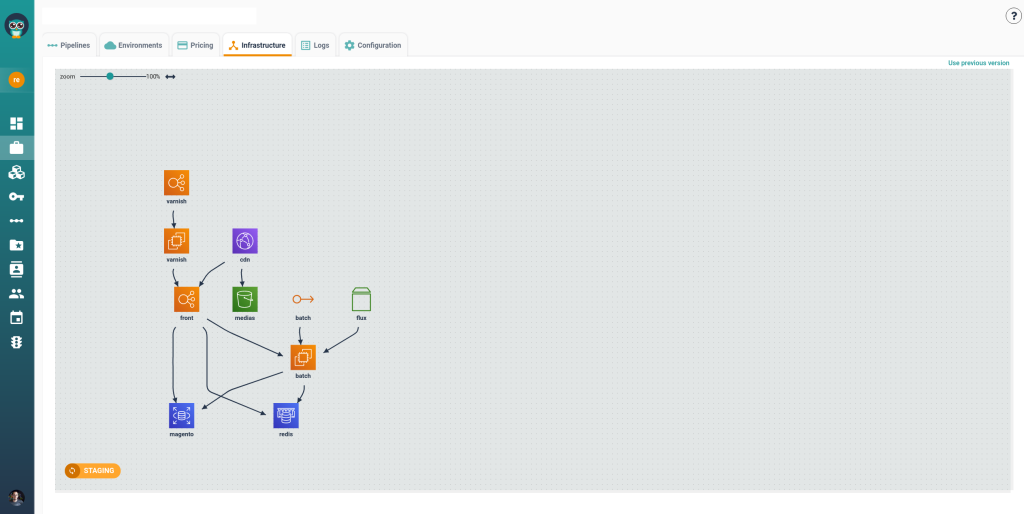
To see Cycloid in action, let’s walk through a practical example of using Cycloid.
Step 1: Centralized Dashboard
- Log in to Cycloid to access all your projects from a single place. This centralizes management, making it easy for teams to see and control applications.

Step 2: Project & Environment Selection
- Choose a project to work on. Cycloid shows Development, Staging, and Production environments, ensuring consistency and visibility across all stages.
- In this example, we choose the devzero project.

Step 3: Manage Environments Efficiently
- Create, configure, or update environments with just a few clicks. Cycloid automates repetitive tasks, helping teams reduce errors and save time.

Step 4: Integrate & Customize Workflows
- Connect your projects to cloud providers (AWS, GCP, Azure) and Git repositories. Customize pipelines to match your team’s workflow while maintaining standardized processes and self-service access.

Step 5: Promote to Production Seamlessly
- Deploy code automatically or with a single click. Cycloid accelerates delivery while keeping control over infrastructure, ensuring your applications run reliably across all environments.
Conclusion
Internal Developer Platforms (IDPs) are transforming the way software is built, deployed, and managed. They simplify complex workflows, automate repetitive tasks, and allow developers to focus on writing code rather than managing infrastructure. By supporting multiple environments —Development, Staging, and Production — IDPs ensure that applications are tested thoroughly and deployed safely.
Adopting an IDP also improves scalability, standardization, and collaboration across teams. It helps organizations deliver software faster, reduce errors, and maintain consistent processes. Overall, IDPs are essential for companies looking to boost developer productivity, streamline operations, and achieve reliable, efficient software delivery.
FAQs
-
What is an Internal Developer Platform (IDP)?
An Internal Developer Platform (IDP) is a centralized system that provides developers with a self-service interface for building, deploying, and managing applications. It abstracts the complexity of underlying infrastructure, CI/CD pipelines, and environment configurations, allowing developers to focus on writing code rather than managing servers or deployment processes.
-
What makes Cycloid different from other IDPs?
Cycloid stands out from other IDPs by offering a unified self-service portal, infrastructure-as-code, and customizable plug-ins. It also integrates FinOps and GreenOps to optimize costs and the environment, and supports AI tools to automate workflows. This makes it a flexible, efficient, and sustainable platform that boosts developer productivity and modernizes operations.
-
Does Cycloid support multi-cloud environments?
Yes, Cycloid fully supports multi-cloud and hybrid cloud environments, allowing organizations to manage infrastructure across AWS, Azure, GCP, and other platforms from a single interface. Its modular architecture ensures consistent deployment, simplifies management, and enables cost and sustainability optimization across clouds.
-
Can an IDP improve developer productivity?
Yes, an IDP centralizes environments, automates deployments, and provides self-service tools, enabling developers to focus on coding rather than managing infrastructure. This reduces bottlenecks and speeds up feature delivery.
-
Is an IDP suitable for small teams or only large organizations?
While IDPs are often associated with large organizations, even small or medium teams can benefit. They provide consistency, automation, and easier onboarding, helping teams scale efficiently as they grow.