Every engineering team has seen it: a developer needs to spin up a new Kubernetes namespace to test a service in isolation. Or maybe deploy a temporary PostgreSQL database to debug a staging issue. Instead of provisioning it themselves, they raise a ticket with the DevOps team. Then they wait. Sometimes for hours. Sometimes for … Read more
What if you could deploy without having to fight cloud configurations, security groups, and Terraform scripts? Developers are responsible for writing application code, testing features, and deploying services, but a large portion of their time is also spent on infrastructure tasks. This means that instead of focusing on delivering new features or optimizing application performance, they often get pulled into provisioning compute instances for their workloads, configuring security groups for networking, and debugging failed deployments within CI/CD pipelines. These tasks require deep knowledge of cloud platforms like AWS, GCP, and Azure, and an understanding of security policies such as IAM role management and VPC configurations, alongside familiarity with automation tools like Terraform, Ansible, and CloudFormation. As a result, managing infrastructure becomes a bottleneck for most teams, slowing down development cycles. Developers need infrastructure to deploy new software or applications, run automated test environments, or scale workloads during traffic spikes. However, setting up infrastructure manually through Terraform scripts, CLI commands, or cloud consoles takes significant time and effort. While DevOps teams support these requests, the volume of infrastructure needs grows as development teams scale. Over time, the increasing demand for new environments, databases, and networking changes overloads DevOps teams, delaying infrastructure availability and slowing down deployments. This is where Internal Developer Platforms (IDPs) come in. An Internal Developer Platform (IDP) is a layer between developers and infrastructure that automates resource provisioning, standardizes deployments, and enforces security policies. It provides a structured platform where developers can deploy applications without manually configuring cloud resources, networking, or access control. Instead of repeatedly writing the same Terraform code for provisioning infrastructure that has likely been written multiple times within the team, organization, and even externally, developers interact with an IDP’s predefined workflows, templates, and APIs. This allows them to request and deploy infrastructure on demand without managing configurations manually, and removes dependencies on DevOps teams, ensures consistency across environments, and speeds up the entire software delivery process. IDPs also address major developer pain points:
Discoverability: Developers often struggle to find existing software or services, identify their owners, and access relevant documentation. This leads to duplicated efforts and wasted time, especially in large engineering teams working across multiple applications. IDPs solve this by providing a centralized service catalog where backend, frontend, and platform engineering teams can access all infrastructure components, environments, and tools in one place.
For example, without an IDP, a backend team might build a new authentication service, unaware that the security team has already developed a similar solution. With a structured platform, developers can quickly locate what they need, reducing redundancy and ensuring teams reuse existing services instead of rebuilding them from scratch.
Self-Service: Without an IDP, developers often need to wait for DevOps teams to manually provision resources, leading to bottlenecks and delays in development cycles. IDPs introduce self-service capabilities by providing pre-configured infrastructure templates and automated workflows. For instance, instead of submitting a request for a Kubernetes cluster and waiting for DevOps to set it up, a developer can select a pre-approved cluster template and deploy it instantly through a self-service portal. This not only accelerates development but also ensures that infrastructure follows security and compliance policies without requiring manual intervention.
Simplified Developer Experience: Managing deployments, tracking logs, and configuring services often requires developers to switch between multiple tools, leading to inefficiencies and context switching. IDPs centralize these functions into a single interface where developers can monitor deployments, manage configurations, and troubleshoot issues without needing to access multiple cloud dashboards.
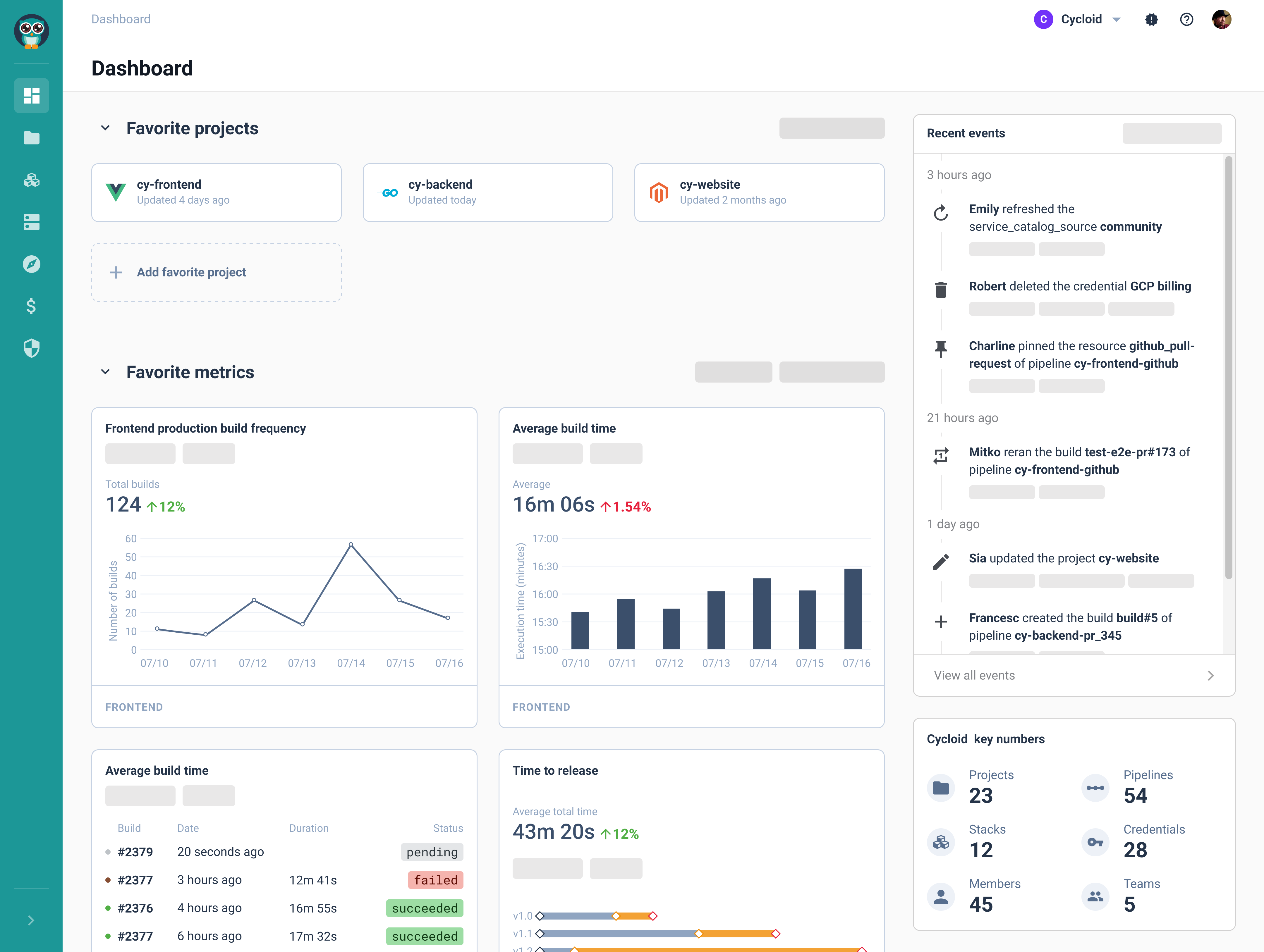
For example, instead of logging into AWS CloudWatch for logs, Terraform for infrastructure changes, and Jenkins for pipeline execution, developers can access all relevant data within the IDP’s unified dashboard, improving efficiency and reducing cognitive load.
What is an Internal Developer Platform?
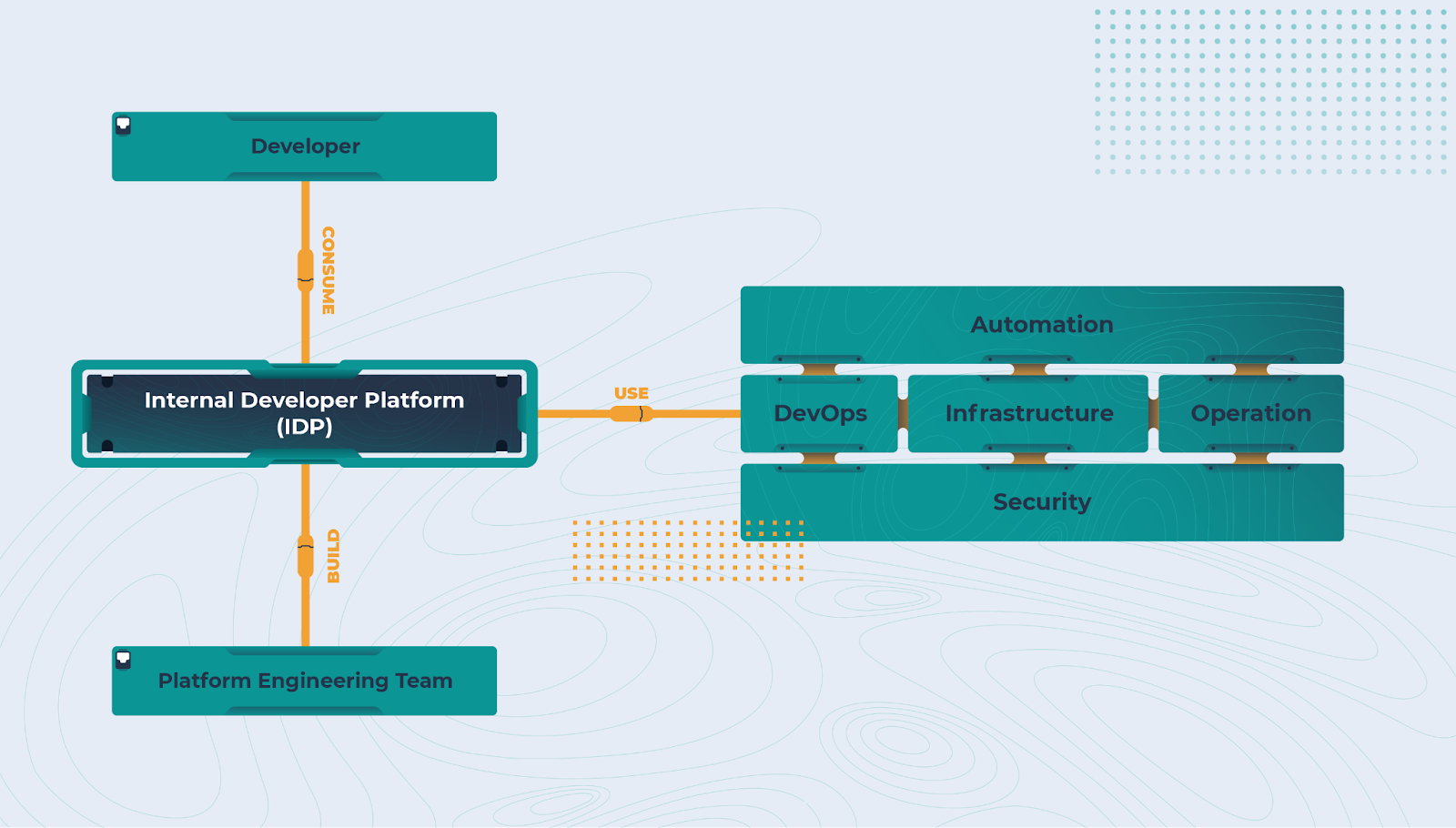
Now that we know managing infrastructure manually slows down software development and adds extra work for DevOps teams, the next step is understanding how Internal Developer Platforms solve this problem. Instead of developers spending time provisioning compute instances, setting up networking, or fixing failed deployments, an IDP automates these tasks and provides a structured way to deploy applications. An IDP sits between developers and cloud services, handling infrastructure provisioning, security enforcement, and deployment automation. Whether it’s creating EC2 instances, managing IAM roles, or setting up Kubernetes clusters, the IDP ensures these tasks follow standardized workflows and security policies so developers don’t have to configure everything manually. If you were to build an IDP from scratch using Backstage, you would quickly realize that Backstage alone does not provide infrastructure automation. It is a framework for creating an internal developer portal, but it does not include native capabilities for provisioning infrastructure, managing CI/CD, or enforcing security policies. To turn Backstage into a fully functional IDP, you would need to integrate ArgoCD or Flux for CI/CD, Prometheus or OpenTelemetry for monitoring, and Crossplane to define CRDs and manage infrastructure as code. Even with plugins like the ArgoCD plugin, it only provides insights into deployments; it does not manage workflows independently. Beyond tooling, a custom-built IDP using Backstage would require extensive API integrations and automation to bridge gaps between different systems. Without these additions, Backstage remains a developer portal, not an IDP. Organizations that choose to build an IDP on top of Backstage must account for the time, resources, and maintenance required to manage integrations, ensure security compliance, and continuously improve the platform. In short, purpose-built IDPs offer these capabilities out of the box, reducing complexity and operational overhead.
Key Features of an IDP
Now, an IDP simplifies infrastructure management by automating provisioning, enforcing security policies, and integrating with DevOps workflows. Unlike a CI/CD pipeline that focuses only on code deployment, an IDP handles infrastructure setup, access control, and observability, making sure it is a simple development and operations process.
Infrastructure as Code for Automation
Manages infrastructure through code-based templates, eliminating manual setup and ensuring consistency.
IDPs integrate with Terraform, OpenTofu, Ansible, Helm, and eventually Pulumi to automate resource provisioning. With Kubernetes as a core component, test environments can be deployed using Helm, streamlining application deployments in a structured and repeatable manner.
Infrastructure is defined as code, ensuring consistency across deployments.
Developers select pre-configured templates instead of writing infrastructure code from scratch.
Version control ensures that changes can be tracked, rolled back, and audited.
CI/CD Pipelines for Deployment
Automates application builds, testing, and deployments, reducing manual work and errors.
IDPs integrate with CI/CD tools through APIs, webhooks, and plugins. They trigger pipeline executions, enforce policies, and manage infrastructure provisioning automatically.
Code changes trigger automated build, test, and deployment pipelines.
Developers don’t need to configure CI/CD workflows – they use pre-built templates that ensure best practices.
Role-Based Access Control for Security
Controls who can modify infrastructure and deploy applications, enforcing strict access policies.
Only authorized users can modify infrastructure or trigger deployments.
Permissions can be set at different levels – project, service, or environment-based access.
Security policies ensure compliance with organizational standards and industry regulations.
By integrating automation, security, and monitoring into one centralized platform, IDPs help teams deploy their applications much faster while ensuring security and compliance at the same time.
Why Are More Organizations Using IDPs?
Managing your cloud infrastructure isn’t as simple as spinning up an EC2 instance or deploying an application. As organizations scale, their infrastructure and environment management become more complex – multiple cloud providers, containerized applications, strict security policies, and interconnected services. Developers need fast access to resources, but setting up environments manually slows them down and increases the chances of misconfigurations. Internal Developer Platforms solve these challenges by automating infrastructure tasks and enforcing standardized workflows across the development ecosystem. Here’s why more organizations are adopting IDPs:
Faster Development Cycles
Provisioning infrastructure manually can take hours or even days, depending on approval workflows and configuration steps. IDPs speed up the process by giving developers access to pre-approved infrastructure setups.
Developers can provision virtual machines, databases, and networking resources instantly instead of waiting for DevOps approvals.
Automated CI/CD pipelines ensure applications are tested and deployed consistently.
Pre-configured templates remove inconsistencies, making sure every environment is deployed the same way.
Lower Operational Costs
Manually handling infrastructure requests puts a heavy load on DevOps teams, increasing operational costs. IDPs automate infrastructure provisioning, allowing developers to self-serve resources without relying on any manual intervention.
Developers can deploy applications without waiting for DevOps to set up environments, reducing downtime.
IDPs offer cost estimation tools, helping teams see expected cloud expenses before deploying resources.
By automating infrastructure management, companies reduce the need for large DevOps teams, optimizing operational costs.
Real-World Impact of IDPs
Organizations that integrate IDPs see measurable improvements in efficiency, security and compliance standards, and cost savings.
85% of organizations agree that investing in IDPs and improving Developer Experience (DevEx) directly contributes to revenue growth.
77% of companies report a significant reduction in time-to-market due to centralized tooling, standardized workflows, and automated deployments.
IDPs help reduce redundant infrastructure tasks, allowing engineering teams to focus on high-value development instead of manual provisioning and troubleshooting.
By automating infrastructure management, enforcing security policies, and simplifying software delivery, IDPs help organizations scale faster while reducing operational overhead.
How Different IDPs Work
There are several internal developer platform examples in the industry, each designed to simplify your infrastructure management and application deployment. Not all Internal Developer Platforms work the same way. While they share the same goal – automating infrastructure provisioning, enforcing security policies, and simplifying deployments, their approaches vary. Some IDPs focus on stack-based deployments, where platform teams define reusable infrastructure components, while others offer UI-driven infrastructure automation, providing a visual interface for developers to configure resources without writing Terraform. Other platforms take an API-first approach, integrating directly into existing DevOps workflows.
Stack-based Deployments
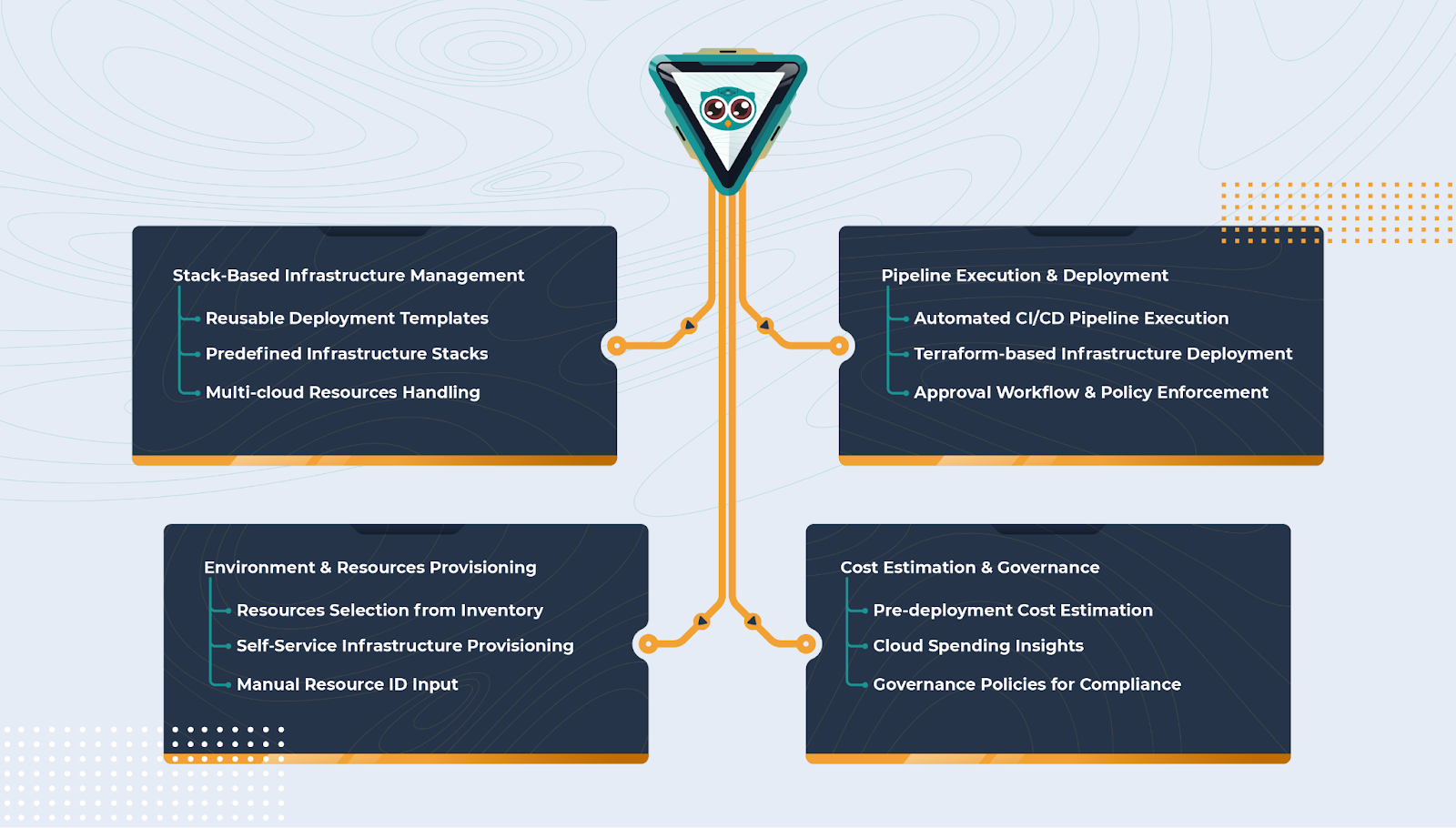
One approach to IDPs is stack-based deployments, where infrastructure configurations are standardized and reused across multiple teams. Cycloid follows this model by allowing platform teams to define stacks for cloud services such as AWS EC2, RDS, and S3. Developers can then deploy these pre-configured stacks without worrying about networking, security groups, or storage configurations. To provide a visual representation of how Cycloid enables stack-based infrastructure management, the diagram below shows how predefined infrastructure stacks, reusable templates, and automated deployment workflows streamline infrastructure provisioning while ensuring governance, cost estimation, and policy enforcement. This works by using Infrastructure as Code, service catalogs, and orchestration layers:
Pre-defined IaC Modules – Platform teams create reusable infrastructure modules using Terraform, OpenTofu, Ansible, Helm, or Pulumi, defining compute, networking, and storage configurations.
Service Catalog & Parameterized Deployment – Developers select a predefined stack (e.g., AWS EC2 + RDS, Kubernetes cluster) from the IDP catalog, customizing parameters like instance type, VPC, and IAM roles.
Automated Provisioning via Workflow Orchestration – The IDP invokes Terraform or Pulumi execution through an automation engine (e.g., ArgoCD, Jenkins, or a custom workflow runner), applying infrastructure changes without manual intervention.
Built-in Policy & Security Enforcement – The IDP integrates with IAM, OPA, or custom rule engines to validate configurations, enforce RBAC, restrict unapproved changes, and ensure compliance with security standards before provisioning.
UI-driven Infrastructure Automation
Another approach is UI-driven infrastructure automation, which simplifies the provisioning process by allowing developers to select infrastructure components through an interactive interface. Instead of writing Terraform scripts or navigating complex Kubernetes configurations, developers can deploy resources with a few clicks. This model integrates with API-based automation, self-service interfaces, and cloud provisioning tools:
Visual Control Plane – Cycloid provides a web interface where users can configure cloud resources through an interactive UI instead of manually writing Infrastructure as Code configurations.
Service Catalog & API Calls – Behind the UI, pre-configured infrastructure templates (Terraform modules, Kubernetes manifests) are stored in a service catalog.
On-Demand Resource Provisioning – When a developer submits a request, the IDP makes API calls to cloud providers (AWS, GCP, Azure) or internal automation layers (Terraform Cloud, ArgoCD) to create infrastructure.
Self-Service with Governance – Role-based access control makes sure that only authorized developers can provision resources, and approval workflows can be enforced if needed.
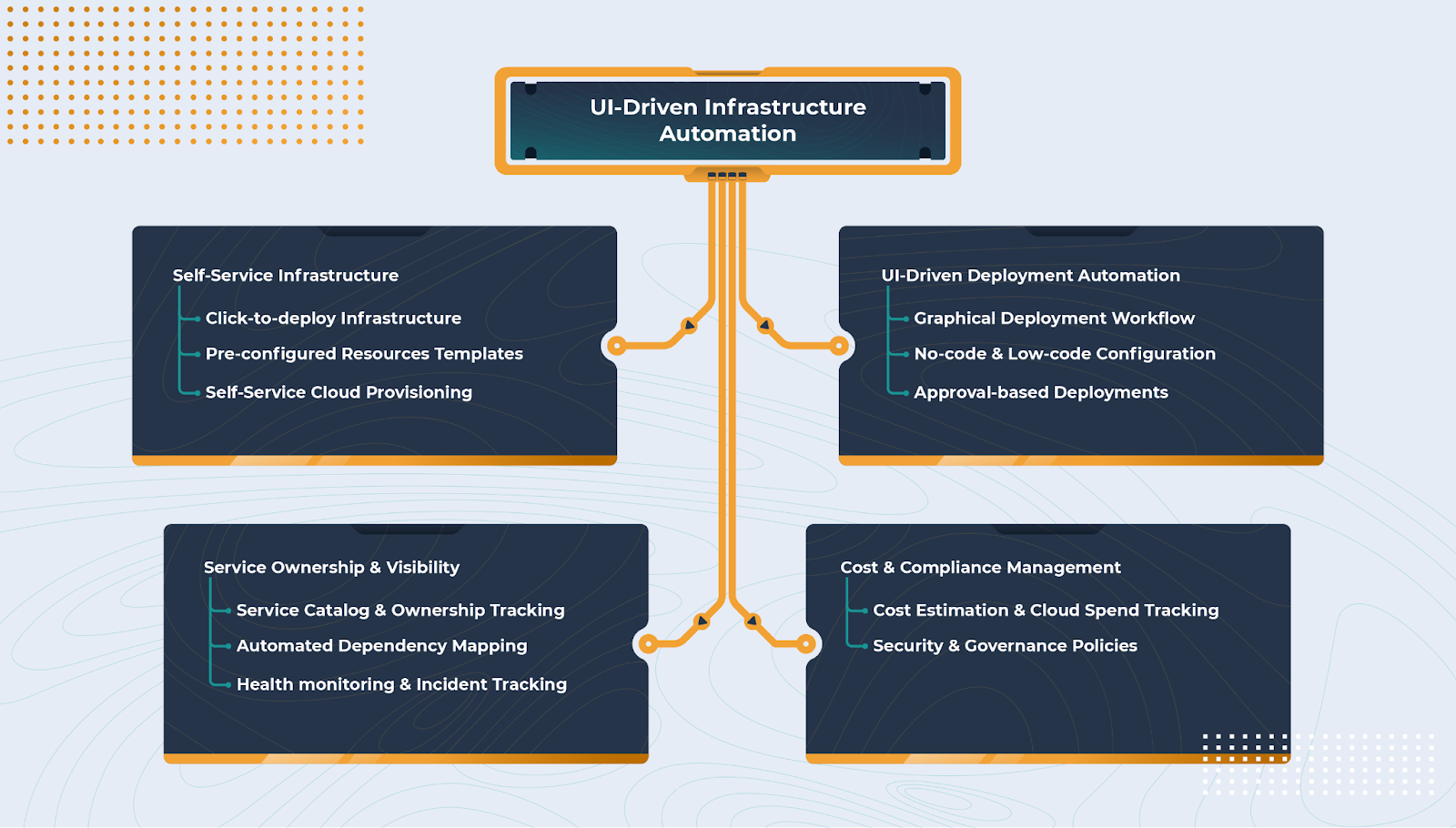
The diagram below shows how UI-driven infrastructure automation enables self-service provisioning, graphical deployment workflows, and governance enforcement through a structured interface. Now, if you were to build an IDP from scratch using Backstage, several challenges would arise. While Backstage provides a framework for building an internal developer platform, it does not include infrastructure automation, security enforcement, or CI/CD management out-of-the-box. This means DevOps teams would need to integrate multiple tools and use custom plugins to make it a full-fledged IDP. Some of the limitations include:
Security & Governance Gaps – Backstage lacks built-in IAM, RBAC, and credential management, requiring custom authentication and policy enforcement integrations (e.g., OPA, Rego, or Terraform Sentinel)by default.
Lack of CI/CD Tracking & Observability – It has no native pipeline tracking, requiring additional plugins to fetch logs from GitHub Actions, GitLab CI, or ArgoCD to monitor deployments.
No Cost Estimation & FinOps Support – Cloud cost tracking isn’t built-in, meaning teams must integrate AWS Cost Explorer, GCP Billing API, or Azure Cost Management separately.
Manual Infrastructure Provisioning – No built-in Terraform or Kubernetes automation, requiring additional configurations and workflow automation.
Deploying an Application Using Cycloid
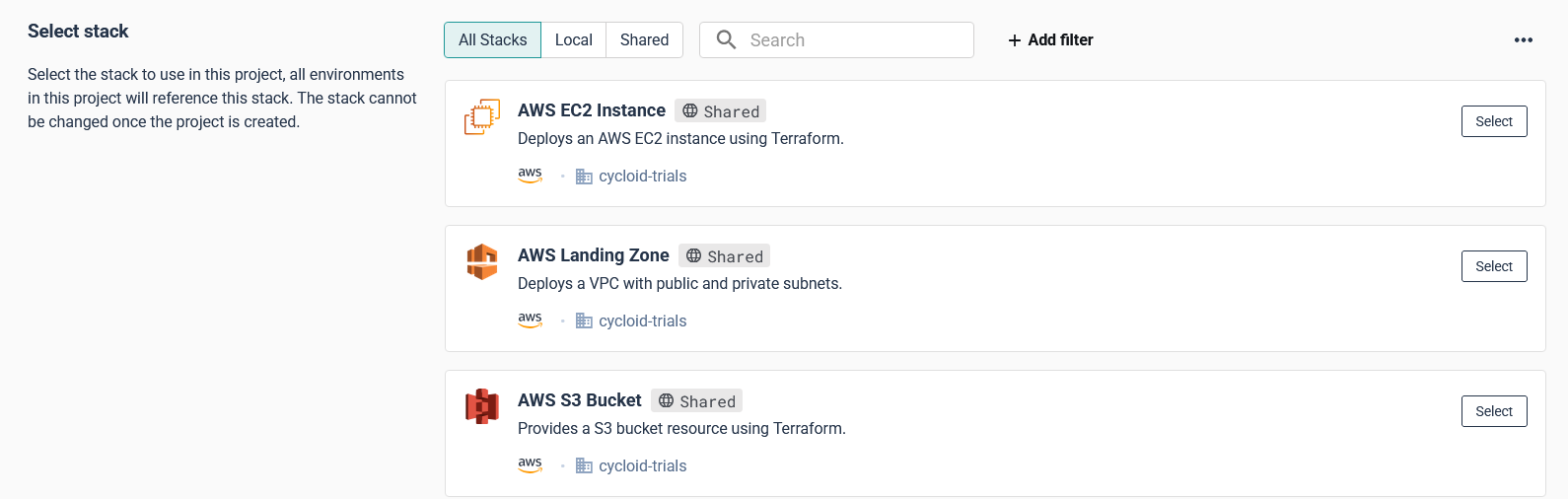
Cycloid easily eliminates these challenges by offering an all-in-one platform that includes stack-based infrastructure automation, security policies, observability, and cost tracking out-of-the-box. Instead of stitching together different tools, Cycloid provides a simple interface for deploying and managing your cloud infrastructure. Instead of writing Terraform from scratch or configuring cloud resources manually, developers can use pre-configured stacks to provision environments, define resources, estimate costs, and deploy applications, all through an automated workflow. The first step in this process is creating a stack. A stack in Cycloid defines the infrastructure resource that will be deployed, such as an AWS EC2 instance, an RDS database, or a Kubernetes cluster. This ensures consistency across deployments for development and operations teams and eliminates the need for developers to manage infrastructure configurations manually. By selecting a predefined stack, teams can enforce security policies, optimize resource allocation, and reduce the risk of misconfigurations. Once the stack is created, the next step is to set up a project. In the upcoming update to Cycloid, a project will serve as the top-level structure where teams can organize deployments more flexibly. Instead of a direct project-to-stack mapping, Cycloid is introducing a component layer, allowing teams to create a project, then define environments such as production or staging, and finally, components within those environments. Each component will utilize a stack, making it possible to compose an application project in an environment using multiple stacks. This enhancement provides greater modularity, enabling teams to manage infrastructure and applications more efficiently while maintaining clear separation between environments and services. The diagram below shows how Cycloid structures deployments with its new component layer. It highlights how projects, environments, and components are organized, with each component leveraging a stack to automate infrastructure provisioning and deployment. This model ensures flexibility by allowing applications to be composed across multiple stacks while maintaining a GitOps-based approach for consistency and governance. Now, developers assign security teams together, configure access permissions, and define environment configurations within the project. Instead of handling networking, IAM roles, or security groups separately, the project inherits these configurations from the stack, making sure that every deployment follows the same standards. With the project in place, developers can move on to setting up an environment. In the upcoming update to Cycloid, an environment (such as production or staging) will act as a structured layer within a project, where applications and infrastructure components are organized. Instead of binding an environment directly to a single stack, Cycloid’s new component layer will allow teams to define multiple components within an environment, each utilizing different stacks. This enhancement enables greater flexibility in managing infrastructure, making it possible to compose an application using several stacks within the same environment. When creating an environment, teams typically define its cloud provider and infrastructure setup based on the project’s requirements. With Cycloid’s upcoming component layer, environments can include multiple components, each leveraging different stacks to support various services within the same environment. This allows teams to flexibly compose applications across multiple cloud providers or infrastructure setups as needed. This flexibility makes sure that existing cloud resources can be reused while maintaining the option to define custom configurations when required. Cycloid automates Terraform execution, provisioning the required infrastructure without requiring developers to apply configurations manually. Cycloid handles everything from instance creation to networking and IAM role assignment, making deployments faster and error-free. Once the infrastructure is provisioned, the CI/CD pipeline takes over. Cycloid follows a GitOps-based approach, where all desired configurations are version-controlled in a Git repository, which serves as the source of truth for infrastructure and application deployments. Cycloid integrates automated pipelines that fetch Terraform configurations, validate infrastructure changes, and ensure deployments remain consistent with the declared state in Git. This ensures that every modification is auditable, reproducible, and aligned with the defined infrastructure state. To ensure clear visibility into deployments, Cycloid provides an Observability Dashboard that gives teams a real-time view of active, paused, and failed pipeline runs. This helps developers track Terraform execution, identify issues in their deployment process, and troubleshoot errors without switching between cloud provider dashboards. By structuring deployments through stacks, projects, environments, and components, Cycloid’s IDP ensures that infrastructure provisioning is consistent, automated, and easily accessible to developers. This approach eliminates the complexity of manual setups, reduces DevOps workload, and accelerates application delivery. To explore Cycloid more as an IDP, refer to the documentation.
Conclusion
So far, we’ve seen how an IDP internal developer platform removes the complexity of delivering software and managing infrastructure. We explored different IDP models and how Cycloid’s stack-based approach allows developers to deploy applications without handling Terraform or cloud configurations manually. With an IDP in place, teams can ship code faster while keeping infrastructure secure and consistent.
Frequently Asked Questions
1. What is the Difference Between a Developer Platform and a Developer Portal?
A developer platform provides tools, automation, and infrastructure for building, deploying, and managing applications, while a developer portal is a centralized interface where developers can access tools, documentation, APIs, and internal services.
2. What is the Difference Between an Internal Developer Platform and a Devops Platform?
An Internal Developer Platform (IDP) automates infrastructure provisioning and abstracts complexity for developers, while a DevOps platform focuses on CI/CD, collaboration, and automating the software development lifecycle.
3. What is an IDP Platform Used for?
An IDP simplifies infrastructure management by automating resource provisioning, enforcing security policies, and providing self-service deployment capabilities for developers.
4. What is the Difference Between an Internal Developer Platform and a Service Catalog?
An IDP automates infrastructure and integrates CI/CD workflows, while a service catalog provides a collection of pre-approved services that developers can request and deploy.
Le Platform Engineering constitue une approche de plus en plus attractive dans le domaine de la livraison de logiciels, car elle présente des avantages tels qu’une mise en marché plus rapide, une satisfaction accrue chez les développeurs, et une augmentation de la synergie entre les équipes. Nous avons déjà écrit au sujet du Platform Engineering, en expliquant qu’il ne s’agit en fait pas d’une pratique inédite, et que le DevOps n’est pas devenu obsolète. Cependant, compte tenu du nombre d’entreprises qui ont eu du mal à générer de la valeur commerciale grâce au DevOps, ces dernières considèrent peut-être que la construction de plateformes numériques internes pour favoriser la livraison de logiciels est une stratégie qui permet de bénéficier de tous les bienfaits du DevOps.
Mais comment ne pas tomber dans le piège qui a empêché 80% des entreprises d’adopter le DevOps?
Notre conseil est le suivant : traitez votre plateforme comme vous traiteriez un produit interne, et les utilisateurs de votre plateforme comme vos clients. En l’occurrence, vos indicateurs de réussite, riches d’une touche de Platform Engineering, devraient être similaires à ceux employés pour vos clients.
Les objectifs fondamentaux du Platform Engineering
Lorsque vous établissez vos indicateurs de réussite, assurez-vous de ne pas perdre de vue les buts de votre stratégie de Platform Engineering. Nous vous présentons les principaux objectifs des entreprises pour leurs équipes sur les plateformes, selon le rapport de 2023 sur l’état du DevOps.
L’éducation et l’émancipation des équipes de développeurs et de conception sont des priorités capitales pour les équipes de plateforme, et elles sont complétées par la vitesse d’itération et la sécurité des processus. Cette approche centrée sur le personnel doit se retrouver dans vos indicateurs de réussite. La réinvention des outils ne représente que la moitié de la tâche : vous devez également vous assurer que vos équipes ont bien maîtrisé l’utilisation des nouveaux systèmes. Les processus de rationalisation et d’automatisation inspirés par les meilleures pratiques de DevX favorisent la productivité générale de l’entreprise ainsi que sa démarcation sur le marché.
Les ICP du Platform Engineering
Selon le report mentionné plus haut sur l’état du Devops, la majorité des entreprises qui ont adopté le Platform Engineering ont constaté des améliorations aux niveaux suivants : fiabilité du système (60%), productivité et efficacité (59%), flux de travaux (57%), auxquelles s’ajoutent une amélioration du temps de développement pour 42% de ces sociétés.
La productivité
Compter le nombre de lignes de code produites par les développeurs sur une période de temps donnée est un indicateur dépassé, qui n’intéresse aujourd’hui que des profils comme Elon Musk. La productivité des développeurs est un sujet sensible, et bien que le Platform Engineering garantit l’accélération de la mise au point de logiciels, celle-ci ne s’opère pas en augmentant les rendus des développeurs.
L’idée, c’est plutôt de leur offrir les meilleures conditions de travail possibles. Pensez à tous les obstacles et contretemps que vos équipes doivent affronter au quotidien et à leur dépendance vis-à-vis des experts pour travailler correctement. Les déploiements d’infrastructures complexes, la création de nouveaux environnements et de fonctionnalités de livraison, sont quelques exemples qui nécessitent une intervention DevOps, ce qui ralentit inévitablement les processus. Les ICP centrés sur la rationalisation et la simplification du processus de livraison de logiciels devraient être votre priorité.
Délai de production
Il s’agit d’une mesure qui calcule le temps entre la mise en place du récit utilisateur et sa livraison. Ce temps comprend les discussions sur le récit utilisateur, l’attente dûe aux retards, et la durée entre la sélection du récit et sa distribution finale.
Si votre délai de production est trop long, c’est le signe d’un obstacle au niveau des processus, qui conduit à l’éternisation des retards. Automatiser tout ce qui peut l’être limitera votre délai de production, car il s’agit d’une preuve de la proactivité de vos équipes pour atteindre leurs objectifs et s’adapter aux retours.
Build it and they will come. That’s the idea, right? But you may have realised, perhaps through a process of failure (we hope not), that that’s not a reliable way to guarantee an audience.
Wider teams are resisting adopting an internal developer platform, and platform engineers are pulling their hair trying to understand why, according to the State of DevOps 2023 Report. Is it too complex? Does it not do the job? Is the UI not sleek enough? Possibly all of the above, but the real culprit is under-education and under-communication about the possibilities of an internal developer platform to your wider team.
Developer self-service is an integral part of platform engineering, and one that has the most number of users across an organization. If you can get your team to adopt developer self-service, your platform engineering strategy is in the bag. But for this to happen, it should satisfy the needs of all – both end-users (devs, solution architects, IT teams) and Ops.
So, building developer self-service, which is more than simply designing a fancy UI (though it is very important and overlooked by many!) – it’s about building a functional tool with a user in mind. It’s not just making it user-friendly – make it user-oriented!
Treating the platform as a product that answers your customers’ (wider teams’) needs is what will help you build a platform that’s going to be easy to adopt.
How can you make developer self-service more user-friendly?
Address the user’s needs
Just like any relationship, it’s all about communication. In an ideal world, end-users communicate their needs, and the platform team responds to them as best they can. The platform team’s role is to put their end-users in the best position to handle tools, processes, and infrastructure, but how exactly that’s done depends on individual members.
Treat your colleagues as if they were your customers, and the platform as a product, then the roadmap becomes so much simpler and clearer.
If your team can’t articulate their wants and needs clearly, take the next best thing – an out-of-the-box industry standard solution. We’ve written loads on the benefits of buying vs building, but the gist is this – why spend hours of your precious time perfecting what’s already been perfected by experts? There’s nothing your team is going to gain from reinventing the wheel, so you’ll be safer with market-tested solutions.
Cycloid’s own self-service portal StackForms prioritizes end-user experience to make configuring new environments as seamless and autonomous as possible. We aim for flexibility, simplicity, and control when it comes to self-service, concealing complex tech behind a user-friendly interface (so hopefully we know what we’re talking about!)
Platform engineering is becoming an increasingly popular approach to software delivery because it offers benefits such as improved time-to-market speed, increased developer happiness, and breaking down of team silos. We wrote extensively about platform engineering, specifically that it’s not, in fact, new and DevOps is not dead. However, given how many enterprises have struggled with delivering DevOps business value, they might view building internal digital platforms to aid software delivery as an actionable plan to achieve everything DevOps ever promised.
But how do you avoid falling into the same trap that held 80% of companies back from adopting DevOps?
Our advice: treat your platform like an internal product, and your wider teams as your customers. This means that your success metrics should be the same as you would use for your customers – with a platform engineering twist.
Key goals of Platform Engineering
When setting up your success metrics, it’s important to not lose sight of what your Platform Engineering strategy should aim for. According to the 2023 State of DevOps report, these were the top goals companies set for their platform teams.
Educating and empowering developer and product teams is a major priority for platform teams, followed by iteration speed and security processes. This people-centric approach is the same one you should adopt in your metrics. Reinventing tools is only half the job – you need to make sure your people are comfortable using the new frameworks. Streamlining and automating processes according to DevX best practices helps the entire organization move more quickly and drive a competitive edge.
Platform Engineering KPIs
According to the 2023 State of DevOps report, after adopting Platform Engineering, the majority of enterprises saw improvements in system reliability (60%), productivity and efficiency (59%), and workflow standards (57%), while 42% reported improved development time.
Productivity
Measuring lines of code produced by developers in X amount of time is an outdated metric used these days perhaps only by the likes of Elon Musk. Developer productivity is a sensitive subject, and while platform engineering promises to speed up software development, it doesn’t happen by making developers deliver more.
Instead, it’s about creating the best conditions for your devs to thrive in. Think about the bottlenecks and obstacles that your teams have to deal with daily and how much they have to rely on experts to get their work done. Complex infrastructure deployments, creating new environments, shipping features – all these require DevOps help, which inevitably clogs up processes. KPIs centered around streamlining and simplifying the software delivery process should be your focus.
Lead Time
This is a measurement that tracks the time from when a user story is initiated to when it’s ready for delivery. This time can also include discussions about the user story, how long it was waiting in the backlog, and how much time it took the story to move from pickup to release.
If your lead time for changes is too high, it’s a clear sign of a roadblock somewhere in your processes, causing items in the backlog not to move along. Automating whatever could be automated will help keep your lead time low, as it shows your teams are quick to adapt to feedback and deliver on their goals.
Deployment Frequency
Deployment frequency tracks how often your end-users deploy code to production. It’s a good measure of the value your engineering teams can deliver to customers. However well-oiled your workflow may be, it can fail to deliver sufficient value if you’re not deploying frequently enough.
High deployment frequency shows that your team can make frequent changes to code and make it live — with little fuss and delays. The easier time your end-users have deploying new infra, the faster it’s going to happen. Consequently, this lagging indicator shows that your development teams are efficiently adopting continuous integration and continuous delivery (CI/CD) practices, deploying small pieces of code frequently, and having a solid grasp of the infrastructure
Developer Happiness
While it might seem a bit unethical to group developer happiness with productivity, fortunately, it turns out that developer happiness and productivity are positively correlated. Platform engineering is specifically aimed at improving the developer experience, which is why measuring your DevX stats is important.
Stability
Stability measures your ability to enable product engineers to make changes confidently and without breaking the end customer experience.
Change Failure Rate (CFR)
Change failure rate measures the percentage of failed deployments to production. This lagging indicator can give you a clear view of software quality and stability. Divide the number of deployments that caused failures by the total number of deployments to get this metric.
By monitoring this metric over time, you can get a good idea of how much effort goes into addressing problems and how much goes into releasing new code. When it’s above 15%, your teams are probably spending too much time fixing problems. This means they could be more productive elsewhere, or some processes need to be improved.
Mean Time to Recover (MTTR)
Mean time to recover is another lagging indicator that shows you how quickly a service can resume normal operation after an interruption. To determine this KPI, calculate how long it takes to deploy a patch after an issue is reported.
Even the best DevOps teams experience unanticipated downtime and issues from time to time. You can’t stop failures from happening — but you need to know how long it takes to get things back up and running after they do.
Efficiency
Productivity and efficiency often get grouped in the same category, but we want to specifically look at cost-effective efficiency metrics, which include the cost of cloud resources, infrastructure, and licenses, as well as the cost of platform engineering teams. Platform engineering is all about the efficient use of resources, so FinOps and GreenOps modules would benefit your resource strategy.
Resource allocation
Resource allocation offers the foundation for productive conversations about balancing several objectives with a fixed amount of resources. Platform engineering should help you distribute limited resources evenly and know exactly where they are spent. Executives will appreciate this metric since it demonstrates whether engineers are focusing on the company’s most crucial goals.
Cost observability
Knowing where you spend your money will help you catch overrunning cloud expenses and waste. As we’ve already mentioned, resource efficiency is one of the pillars of platform engineering, and that’s why we encourage companies to take a sober approach to their cloud consumption.
Transparent cost KPIs will help you achieve this goal. Giving end-users and platform teams alike the ability to see the cost impact of their architecture designs before deploying or a holistic overview of all cloud expenses will be the make-or-break element in your success.
Platform Engineering KPI dashboards
Many of these KPIs have a shared responsibility between teams – keep this in mind when visualizing your metrics. Transparency and observability are one of the things that contribute to breaking down team silos, so shared comprehensive KPI dashboards are something to consider. Consider, for example, what KPIs look like at Cycloid:
Bottom line
Given that a third of platform teams are still struggling with the wider team’s resistance to platform adoption, keeping an eye on your adoption progress should be among your wider KPIs. After all, a platform is meant to benefit the whole company and bring teams to work closer together, and that requires cooperation on all sides.
No matter which metrics you choose, it’s important to set realistic expectations within the company during the early years of platform team adoption. Your KPIs will evolve as you move through your Platform Engineering journey, but in the early stages, you should focus on making it much easier for platform and product teams to ingest their data and make it actionable.
Curious about Cycloid Platform Engineering? Get a personalized demo from our team: {{cta(‘2fa281d7-afe7-428b-94b2-6e02f8188729’)}}
Amidst the Great Resignation, DevOps talent shortage and the looming global economic crisis, retention of skilled and passionate professionals will continue to be a priority for IT businesses in 2022. After all, skill and talent gaps remain the top hurdle for business transformation, according to DevOps Institute Upskilling Report 2022 that Cycloid co-sponsored. But where do you find the right talent? How do you harvest the much-needed skills?
At the start of 2022 and ahead of the DevOps Institute’s 2022 Upskilling Report, we made some predictions for the DevOps jobs market, upskilling, and how both topics link with developer experience (DevX). The report is out (and we’re sponsoring it!) and the answers are in – let’s see how aligned they were!










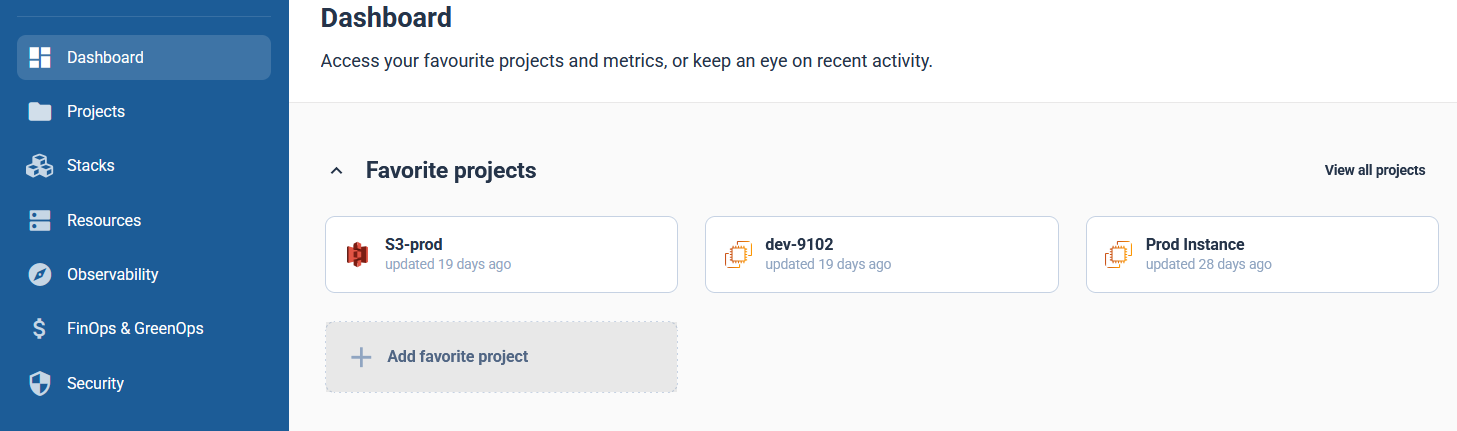
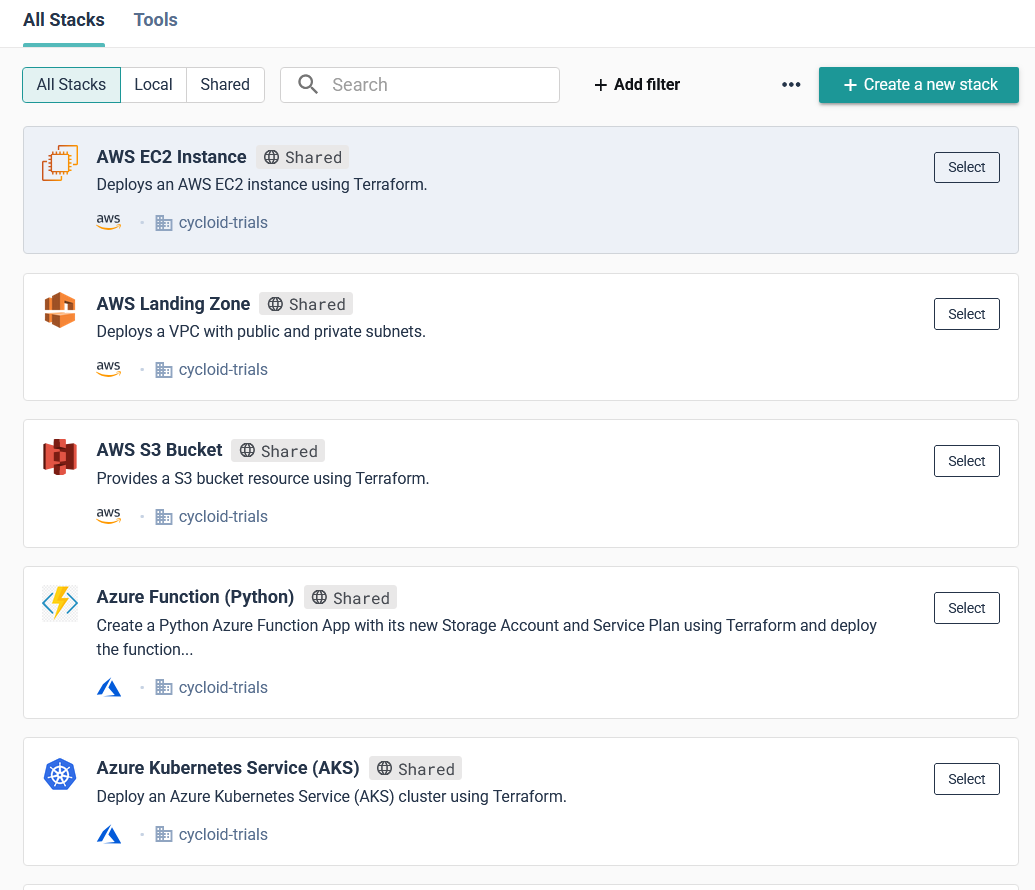 This ensures consistency across deployments for development and operations teams and eliminates the need for developers to manage infrastructure configurations manually. By selecting a predefined stack, teams can enforce security policies, optimize resource allocation, and reduce the risk of misconfigurations. Once the stack is created, the next step is to set up a project. In the upcoming update to Cycloid, a project will serve as the top-level structure where teams can organize deployments more flexibly. Instead of a direct project-to-stack mapping, Cycloid is introducing a component layer, allowing teams to create a project, then define environments such as production or staging, and finally, components within those environments. Each component will utilize a stack, making it possible to compose an application project in an environment using multiple stacks. This enhancement provides greater modularity, enabling teams to manage infrastructure and applications more efficiently while maintaining clear separation between environments and services.
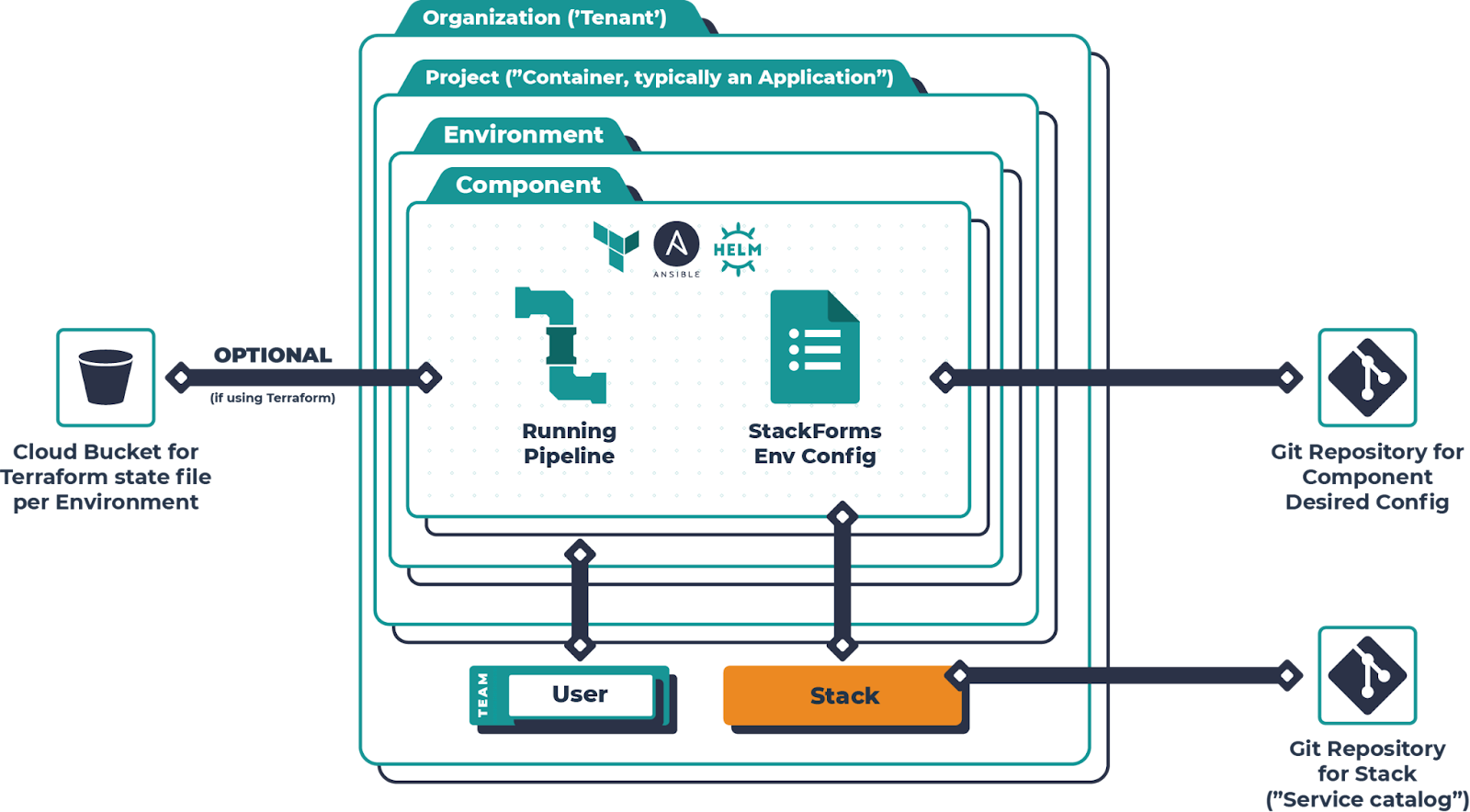
  The diagram below shows how Cycloid structures deployments with its new component layer. It highlights how projects, environments, and components are organized, with each component leveraging a stack to automate infrastructure provisioning and deployment. This model ensures flexibility by allowing applications to be composed across multiple stacks while maintaining a GitOps-based approach for consistency and governance.
  Now, developers assign security teams together, configure access permissions, and define environment configurations within the project. Instead of handling networking, IAM roles, or security groups separately, the project inherits these configurations from the stack, making sure that every deployment follows the same standards.
 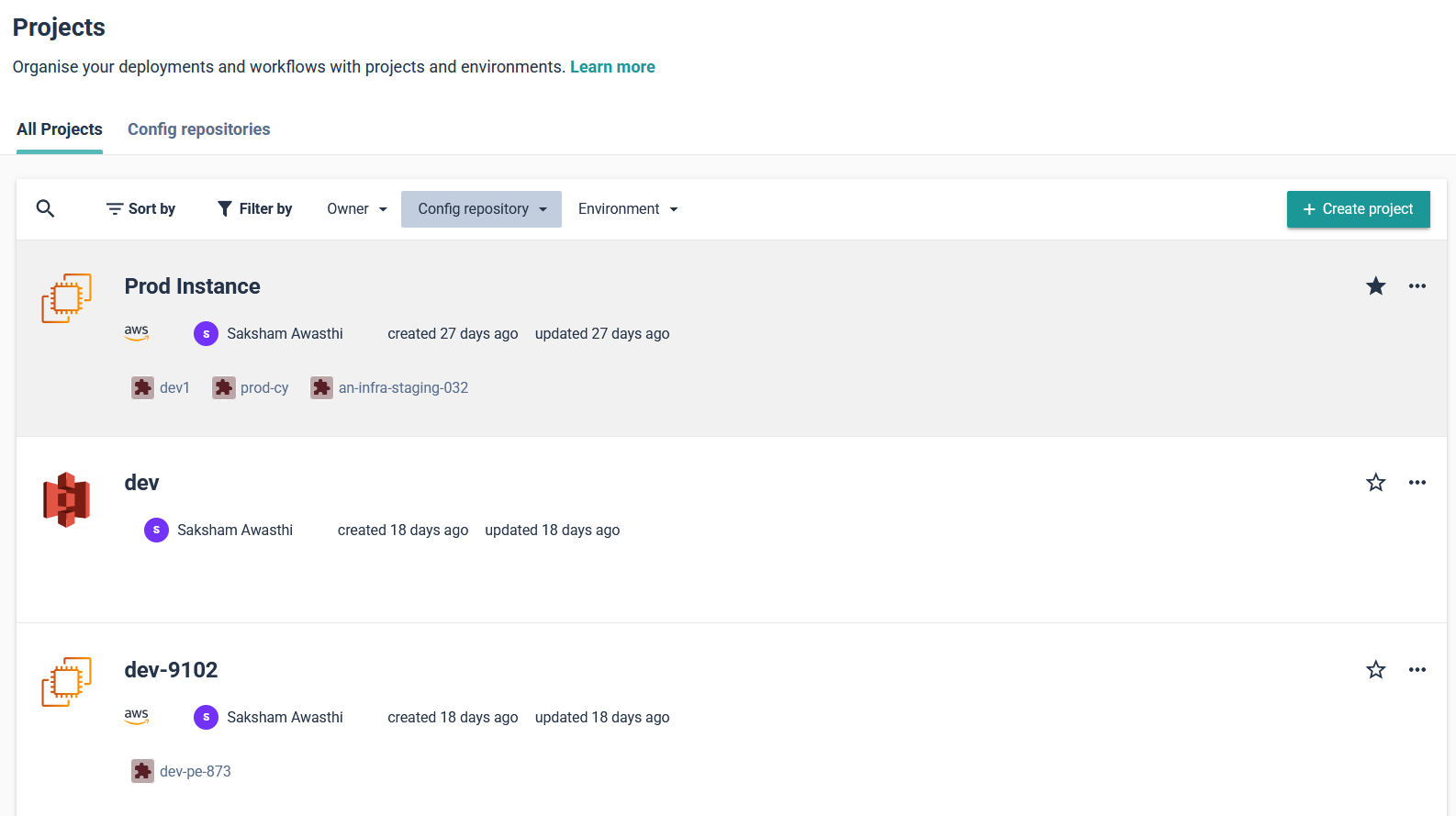 With the project in place, developers can move on to setting up an environment. In the upcoming update to Cycloid, an environment (such as production or staging) will act as a structured layer within a project, where applications and infrastructure components are organized. Instead of binding an environment directly to a single stack, Cycloid’s new component layer will allow teams to define multiple components within an environment, each utilizing different stacks. This enhancement enables greater flexibility in managing infrastructure, making it possible to compose an application using several stacks within the same environment.
 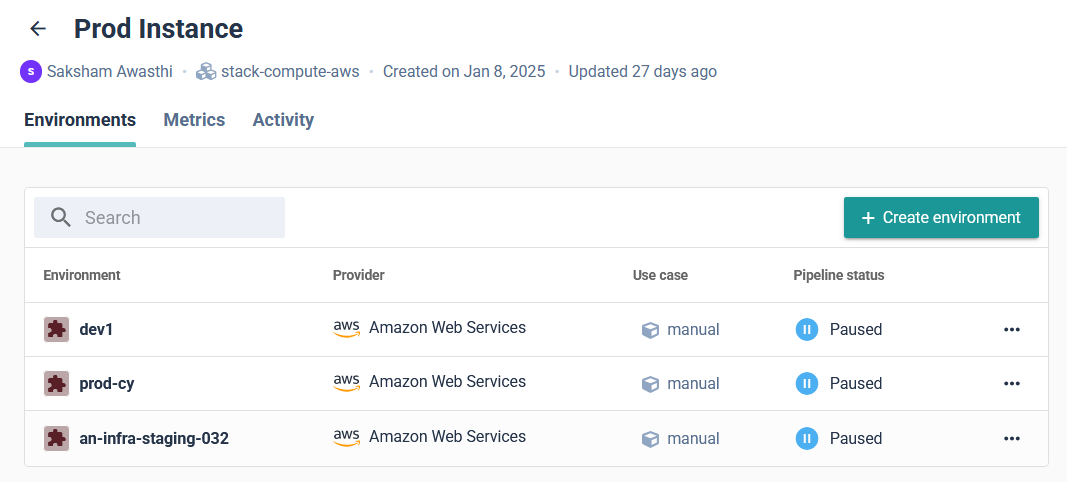 When creating an environment, teams typically define its cloud provider and infrastructure setup based on the project’s requirements. With Cycloid’s upcoming component layer, environments can include multiple components, each leveraging different stacks to support various services within the same environment. This allows teams to flexibly compose applications across multiple cloud providers or infrastructure setups as needed.
 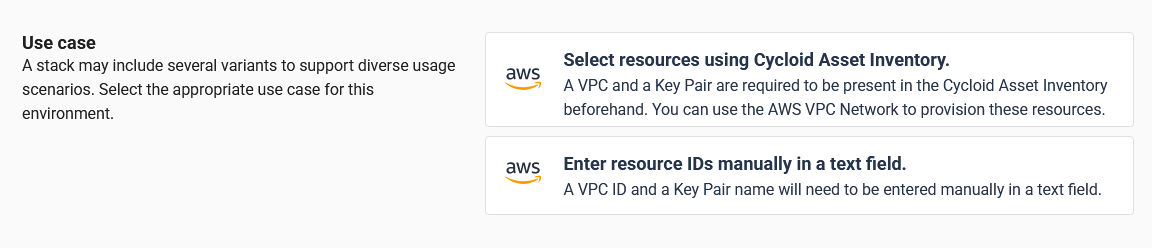 This flexibility makes sure that existing cloud resources can be reused while maintaining the option to define custom configurations when required. Cycloid automates Terraform execution, provisioning the required infrastructure without requiring developers to apply configurations manually. Cycloid handles everything from instance creation to networking and IAM role assignment, making deployments faster and error-free. Once the infrastructure is provisioned, the CI/CD pipeline takes over. Cycloid follows a GitOps-based approach, where all desired configurations are version-controlled in a Git repository, which serves as the source of truth for infrastructure and application deployments. Cycloid integrates automated pipelines that fetch Terraform configurations, validate infrastructure changes, and ensure deployments remain consistent with the declared state in Git. This ensures that every modification is auditable, reproducible, and aligned with the defined infrastructure state. To ensure clear visibility into deployments, Cycloid provides an Observability Dashboard that gives teams a real-time view of active, paused, and failed pipeline runs. This helps developers track Terraform execution, identify issues in their deployment process, and troubleshoot errors without switching between cloud provider dashboards. By structuring deployments through stacks, projects, environments, and components, Cycloid’s IDP ensures that infrastructure provisioning is consistent, automated, and easily accessible to developers. This approach eliminates the complexity of manual setups, reduces DevOps workload, and accelerates application delivery. To explore Cycloid more as an IDP, refer to the

.png)