






TL;DR
- A golden path is an opinionated, supported, self-service route for a repeated engineering task, such as creating a service or provisioning a database.
- Golden paths stall when they ship as templates alone: inputs stay free text, nothing checks the plan before it applies, and every change reaches every team on the same day.
- A governed blueprint wraps the template in four controls: constrained inputs, checks before apply, role-based access, and versioned releases with visible usage.
- Cycloid, an internal developer portal and platform in one product, packages a golden path as a Blueprint: one versioned file that holds the Form, the workflow, the approval rules, and the Day-2 actions, so platform teams set the rules and developers and AI agents self-serve inside them.
- A Form with a fixed list of instance sizes and an owner from the deploying team removes the two most common free-text errors before anything runs.
Suppose we have a large enterprise with 40 product teams and a platform team of eight engineers. Every week, teams ask for the same things: a new web service, a database, a pipeline, a fresh environment. Each team solves them a little differently, and the differences show up later as security gaps, surprise cloud bills, and a ticket queue that the platform team never clears.
This guide follows that enterprise through one golden path, a standard customer-facing web service. It defines the term, shows why a template alone stalls, adds the controls that make the path safe, and then builds the path hands-on in Cycloid with a Form, a guardrail, a role, and a published version, then promotes it from development to production.
What a Golden Path Is in Platform Engineering Terms
Platform engineering is the practice of building an internal developer platform (IDP), a shared set of tools and automation that developers use to ship software without learning every underlying system. A golden path is the recommended route through that platform for one repeated task, such as creating a backend service, provisioning a database, or adding an environment.
Google Cloud’s guidance lists nine principles for a golden path, and four of them frame this guide:
- A single, clear, and opinionated method for a specific task.
- Self-service, so any developer can use it with no ticketing system.
- Built around the organization’s specific needs.
- Optional, so a developer with unusual needs can still leave the path.
The idea started at Spotify, where the first golden path was a backend engineering tutorial that began as a Hack Week project. Spotify built it to end what its engineers called rumour-driven development, where the only way to learn how to do something was to ask a colleague.
In our enterprise, the first path is a customer-facing web service: a container service, a database, a pipeline and the right tags, all created from one request.
How a Golden Path Compares With a Service Catalog
Some companies call the same idea a paved road, and both terms describe a supported default route that teams can leave. A service catalog is different: it lists the services, owners, and dependencies that already exist, so it answers what is running today.
Take the enterprise’s catalog, which lists 60 services and the team that owns each one. It still has no agreed way to create the 61st. The catalog tells a new engineer who owns the payments service, and the golden path tells that engineer how to create a payments-grade service with the right network, tags, and pipeline already in place.
The two work best together. The catalog records what each golden path produced, and the path keeps new entries consistent enough to be worth cataloging.
Why Golden Paths Stall After the First Template Ships
In the enterprise, the platform team publishes the web service path as a Terraform module plus a pipeline file. The first month goes well because the platform team watches every request. Problems show up once dozens of teams use the same template with their own values.
Three gaps appear in almost every rollout:
- Free-text inputs. A developer types an instance size, a region, or a tag value into a variable, and nothing limits the answer to the approved set.
- No check before apply. The template runs terraform plan and then terraform apply, and a reviewer has to read the plan by eye to catch a public bucket or a missing tag.
- Changes land everywhere at once. When the platform team edits the template, every consumer inherits the change on the next run, with no way to pin an older release or see who has moved to the new one.
Each gap pushes work back to the platform team as tickets, approvals, and clean-up. The path still exists, but developers stop trusting it, and the exceptions pile up faster than the standard route.
How a Platform Team Picks the First Golden Path to Build
DORA’s 2025 report found that 90% of organizations use an internal developer platform and 76% have dedicated platform teams, and its platform engineering guidance advises starting with the most common workflow while avoiding a rigid “golden cage” that ignores how different teams work.
In the enterprise, last quarter’s ticket count puts web service requests at the top, ahead of data pipelines and mobile builds. The platform team builds the web service path first, and the other paths wait until it proves itself.
What a Governed Blueprint Adds to a Golden Path
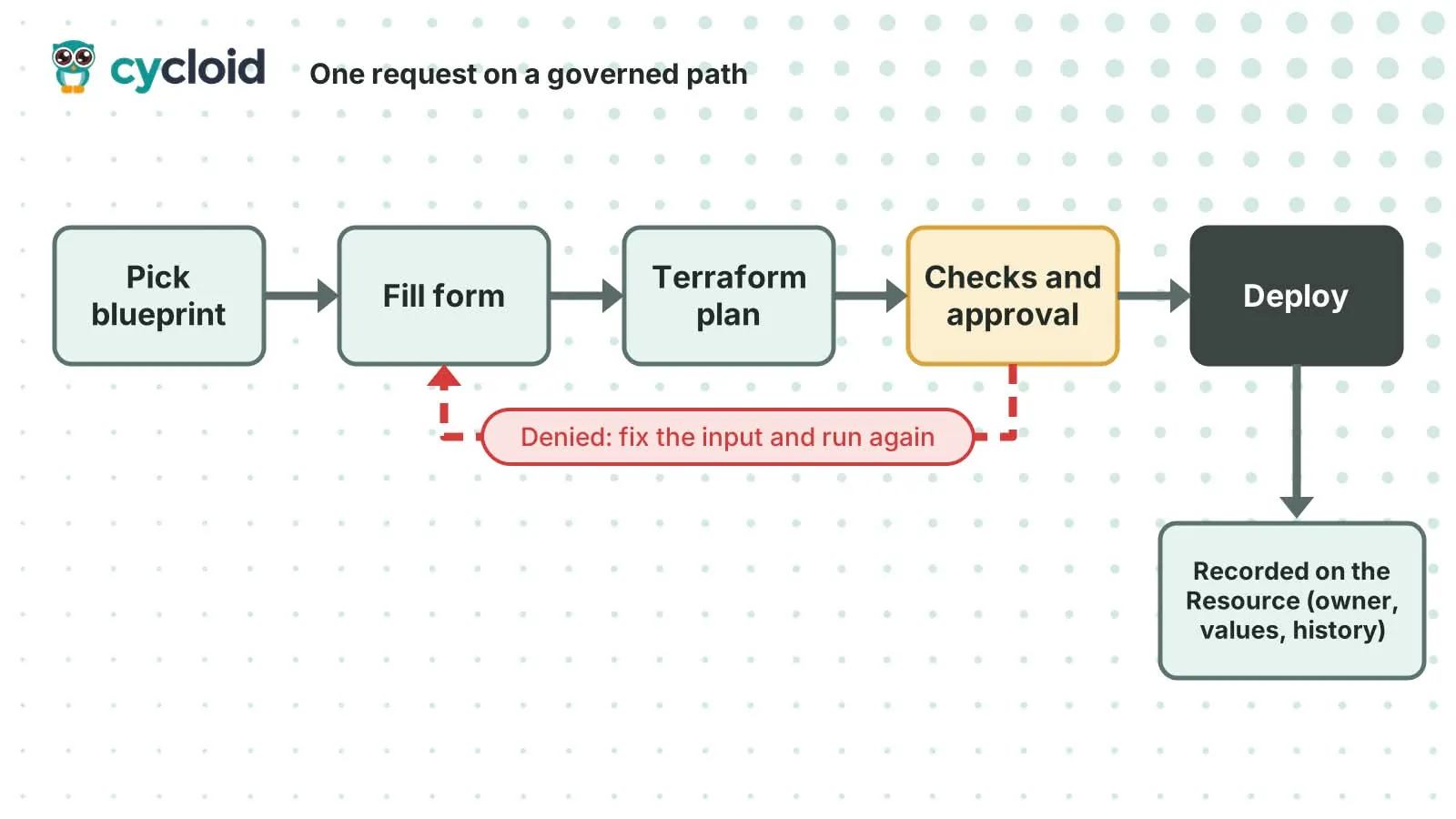
A blueprint is a reusable infrastructure template with parameters, such as a Terraform module or a Helm chart for one standard setup. A governed blueprint packages that template together with the rules that decide who can use it, which values are allowed, and how it changes over time.
Four controls turn a template into a governed blueprint:
- Constrained inputs: A Form replaces free text with a fixed list of approved values and required fields for ownership data.
- Checks before apply: Conditions and approval rules decide whether a change may run, and a policy step can test the plan.
- Access by role: Platform engineers publish and edit blueprints, while developers only consume them within their own team’s Resource Groups and environments.
- Versioned releases with visible usage: Each change ships as a numbered version, teams upgrade when ready, and the platform team can see who runs which version.
In the enterprise, these four controls decide whether the 40 product teams can create web services on their own or keep opening tickets. The sections below show how each control looks in practice, using Cycloid as the working example.
How Cycloid Packages a Golden Path as a Blueprint
Cycloid is an internal developer portal and platform in one product. Platform teams build Blueprints with approvals and guardrails, and developers and AI agents deploy inside them.
- Access: ReBAC, RBAC, ABAC, and approvals control who can see and do what.
- Works with your existing tools: Terraform, OpenTofu, Ansible, Helm, GitHub Actions and GitLab CI.
- Runs as: SaaS, dedicated SaaS, self-hosted, on-prem or air-gapped.
In Cycloid, a Blueprint is the golden path as a working object. One object carries:
- The architecture, in Terraform, OpenTofu, Ansible, or Helm
- A Form for developers
- Rules that check requests
- Day-2 actions, the operations after the first deploy, such as scaling, restarting, rolling back, backing up, or running a plan
The enterprise platform team builds its web service path as one such object, and the 40 product teams pick it from the Deployment Catalog.
Developers are not the only ones who deploy from a Blueprint. AI agents reach the catalog in two ways:
- Cycloid’s MCP server, so Claude, Cursor or any MCP client can deploy from it.
- Cycloid’s built-in agent, which runs on the LLM the customer chooses.
The agent shows the same Form inside the conversation, and every action goes through the same four checks as the person who asked. Teams that already have a portal, such as ServiceNow, Backstage or a custom UI, can deploy the same Blueprint and Form through Cycloid.
Each Blueprint is one file, blueprint.yaml, that holds its identity, requirements, credentials, the Form, and the actions with their workflows.
It can live in Git next to the Terraform or Helm code that does the work, and Cycloid syncs it into the catalog on every push. The enterprise platform team keeps its web service Blueprint next to the Terraform it already has, and you can also write a Blueprint directly in the Cycloid UI.
Blueprints live in Cycloid, which stores them and the deployed values in its own database. A Blueprint repository in Git is optional, and there is no separate configuration repository: what a developer enters in the Form is stored on the Resource.
Everything sits inside a simple hierarchy:
- A workspace contains teams, and teams can nest.
- Teams own Resource Groups.
- A Resource Group gathers related Resources, such as the pieces of a webshop, across environments.
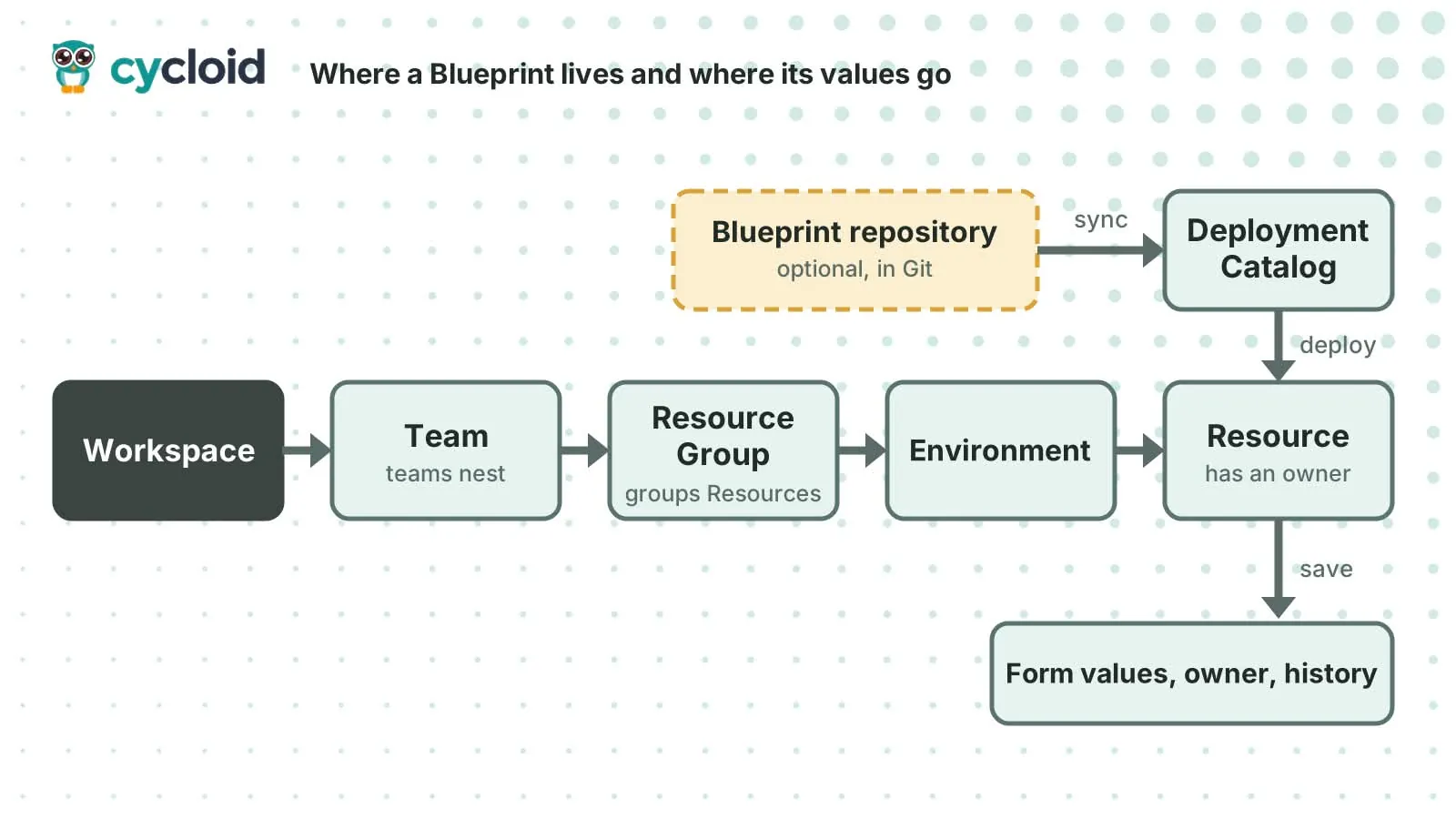
A Resource is anything Cycloid creates or tracks, such as a database or a web service, and each one has an owner.
The Deployment Catalog lists each Blueprint as a card that a developer can pick and deploy. Platform teams choose which Blueprints each team sees first, so every team lands on the entry points chosen for it.
A Blueprint can be a single Resource or a whole stack, as the “Web Application Stack” and “Application Suite” cards show, and a developer who finds nothing suitable can click “Request a Blueprint”. That card is the golden path in its finished form: one approved route, listed where developers already look.
After a deploy, the developer lands on the Resource Group page, which shows the promotion pipeline, the Resources in each environment, and who owns them.
How Blueprint Forms Constrain Inputs Before Anything Deploys
A Form is the part of Cycloid that turns a Blueprint’s inputs into a web form. The platform team describes it in the form: a block of blueprint.yaml, and developers fill it in without touching Terraform. A Form is a flat list of fields (content), or a set of sections, or wizard steps.
Each field takes an id, name, description, type, values, default, and required setting, and can be made read-only or hidden under a condition.
Cycloid infers the widget: a closed list of five values or fewer shows as radio buttons, a longer list as a dropdown, and values can also come from a live source such as the regions of a connected cloud account.
Ownership is native too: every Resource has a stewarding team and owner fields, such as code owner and security stakeholder, so a Form can take the owner from the deploying team instead of asking for it.
In the enterprise, the security team allows only three instance sizes and wants every resource tagged with an owner team. The blueprint.yaml excerpt below does that, and it also holds the deploy workflow that the next sections refer to:
# web-service/blueprint.yaml (excerpt)
id: web-service
name: Web Service
description: Container service, database and pipeline, tagged and owned
environment_scope: required
requirements:
  providers: [aws]
form:
  sections:
    - id: runtime
      name: Runtime
      content:
        - id: compute.instance_type
          name: Instance size
          description: Approved sizes only
          type: string
          allow_input: false
          values: [t3.small, t3.medium, t3.large]
          default: t3.small
          required: true
        - id: tags.owner_team
          name: Owner team
          description: Team tag applied to every resource
          type: string
          readonly: true
          default: !jq '.team.name'
actions:
  - id: deploy
    name: Deploy
    trigger: manual
    workflow:
      steps:
        - id: plan
          type: terraform
          params: { command: plan }
          artifacts:
            outputs: [plan_file, plan_json]
        - id: review
          type: approval
          depends_on: [plan]
          params:
            message: Review the plan before it applies
            show_output_from: [plan]
            approver_groups:
              - target_type: team
                target: platform-team
                min_approvals: 1
        - id: apply
          type: terraform
          depends_on: [review]
          params:
            command: apply
            plan_file: !jq '.steps.plan.outputs.plan_file'
Three things in the Form do the work:
- With allow_input set to false and three values, the developer picks from radio buttons and cannot type another size.
- The tags.owner_team field is read-only and filled from the deploying team, so no request can leave the owner empty.
- The dotted IDs, compute.instance_type and tags.owner_team, build the nested values that are passed to Terraform.
A developer can no longer type an unapproved size, and the Blueprint cannot deploy without an owner.
The values the developer submits are stored on the Resource, with every change in its Activity history.
How Conditions and Approvals Stop a Bad Change Before It Applies
A Form limits what a developer can type, but it cannot see who is asking, where the change will land, or what Terraform is about to create. Three mechanisms cover that gap, and each one runs before anything applies.
Conditions (ABAC). A condition is a rule that only ever restricts a role. It can depend on the environment type, a time window, or an attribute of the Blueprint or the Resource. In the enterprise, Developers can deploy the web service anywhere except production.
Approval rules. A request that matches an approval rule waits for sign-off before it runs, and the sign-off is routed to a role, a team, or the Resource’s owner. In the enterprise, any production deploy of the web service needs one approval from the platform team.
An approval step after the plan. The Blueprint’s workflow runs terraform plan, then pauses on an approval step that shows the plan to the approver. Apply runs only once the plan is approved, and it applies that exact plan, as the review step in the excerpt above shows.
An approval step in the workflow applies to every run. To require approval only in production, the platform team sets an approval rule on the production environment type instead.
Optional: bring your own policy engine. Some teams already write their policies in Rego. A workflow step can run any container image, so such a team can run Conftest (or Checkov) on the plan in a step between plan and apply. This is a policy engine the team brings, not a built-in feature. A failing step stops the run before anything applies.
- id: policy-check
  type: shell
  depends_on: [plan]
  params:
    image: openpolicyagent/conftest
    script: conftest test --policy policy/ /cycloid/inputs/plan/plan_json
  artifacts:
    inputs:
      - from: plan
The policy below denies any aws_instance without tags and skips resources being deleted. Conftest reads the plan JSON as input.resource_changes:
package main

import rego.v1

is_delete(r) if r.change.actions == ["delete"]

has_tags(r) if count(r.change.after.tags) > 0

deny contains reason if {
  some r in input.resource_changes
  r.type == "aws_instance"
  not is_delete(r)
  not has_tags(r)
  reason := sprintf("resource %s has no tags", [r.address])
}
With this step in place, the review step depends on policy-check, so a denied plan never reaches the approver. The enterprise story works without Rego: the Form removes untagged requests at the source, a condition keeps developers out of production, and an approval puts a platform engineer in front of every production plan.
How Roles Separate Publishing a Path From Deploying It
Roles decide who can do what. In Cycloid, roles are held at the team level, not at the organization level. The roles are Team Lead, Developer, and Viewer, plus Tenant Admin for the workspace.
Teams nest, and visibility flows down to child teams, never sideways or up. In the enterprise, platform engineers hold the right to publish Blueprints, and the product teams deploy them into their own Resource Groups.
A role alone is a blunt tool, so conditions and approvals sharpen it. In the enterprise:
- A Developer can deploy and view, but never to production, and cannot destroy or read secrets.
- A production change waits for a named approver before it runs.
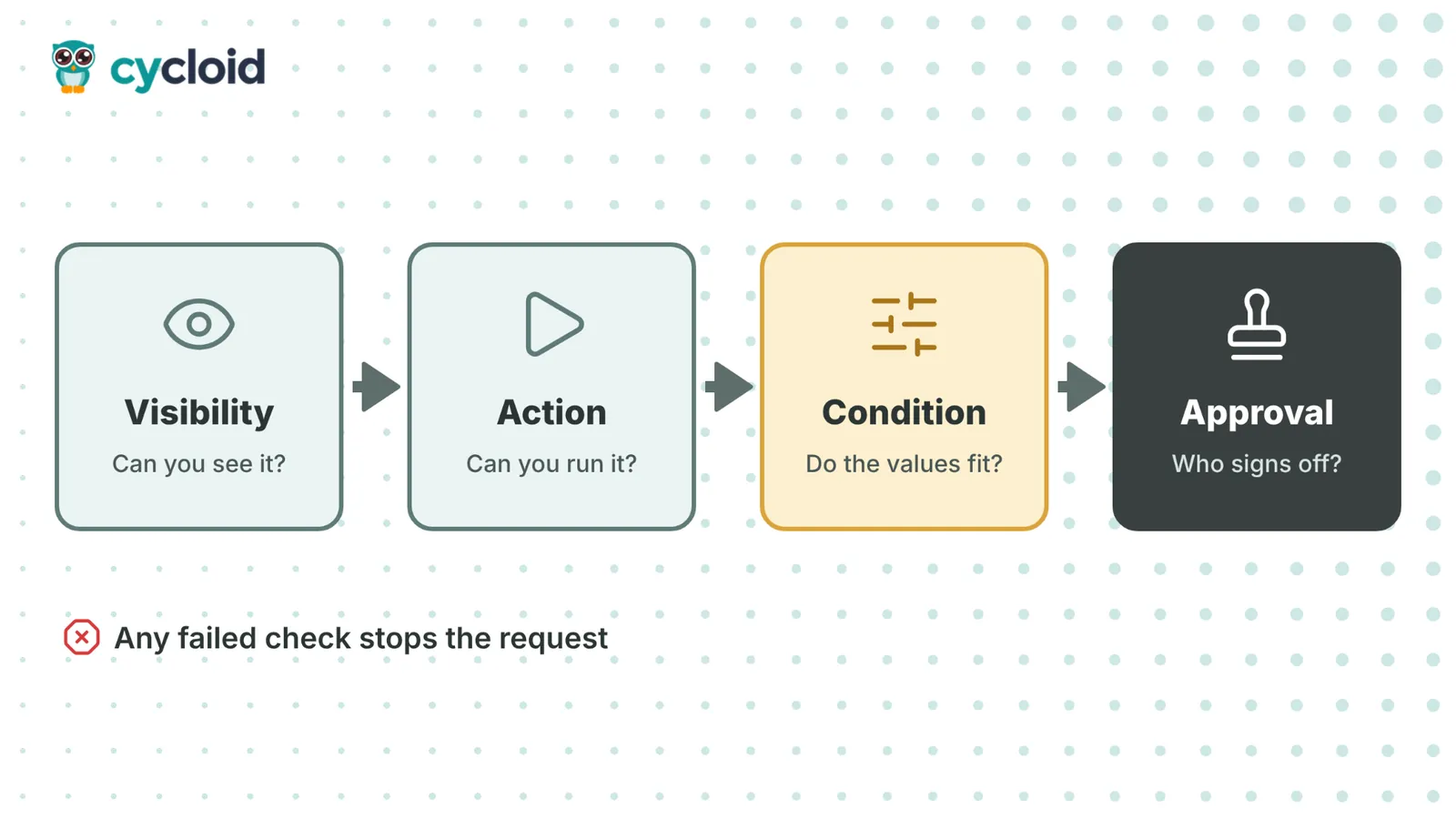
Roles are one of four checks. Cycloid’s authorization model runs every action through four layers:
- ReBAC decides what a person can see.
- RBAC decides what they can do.
- ABAC decides under what conditions.
- Approval decides who must sign off.
A condition can only tighten a role and never widen it, and an AI assistant goes through the same chain as a person.
How Blueprint Versioning Rolls Out Changes Without Surprises
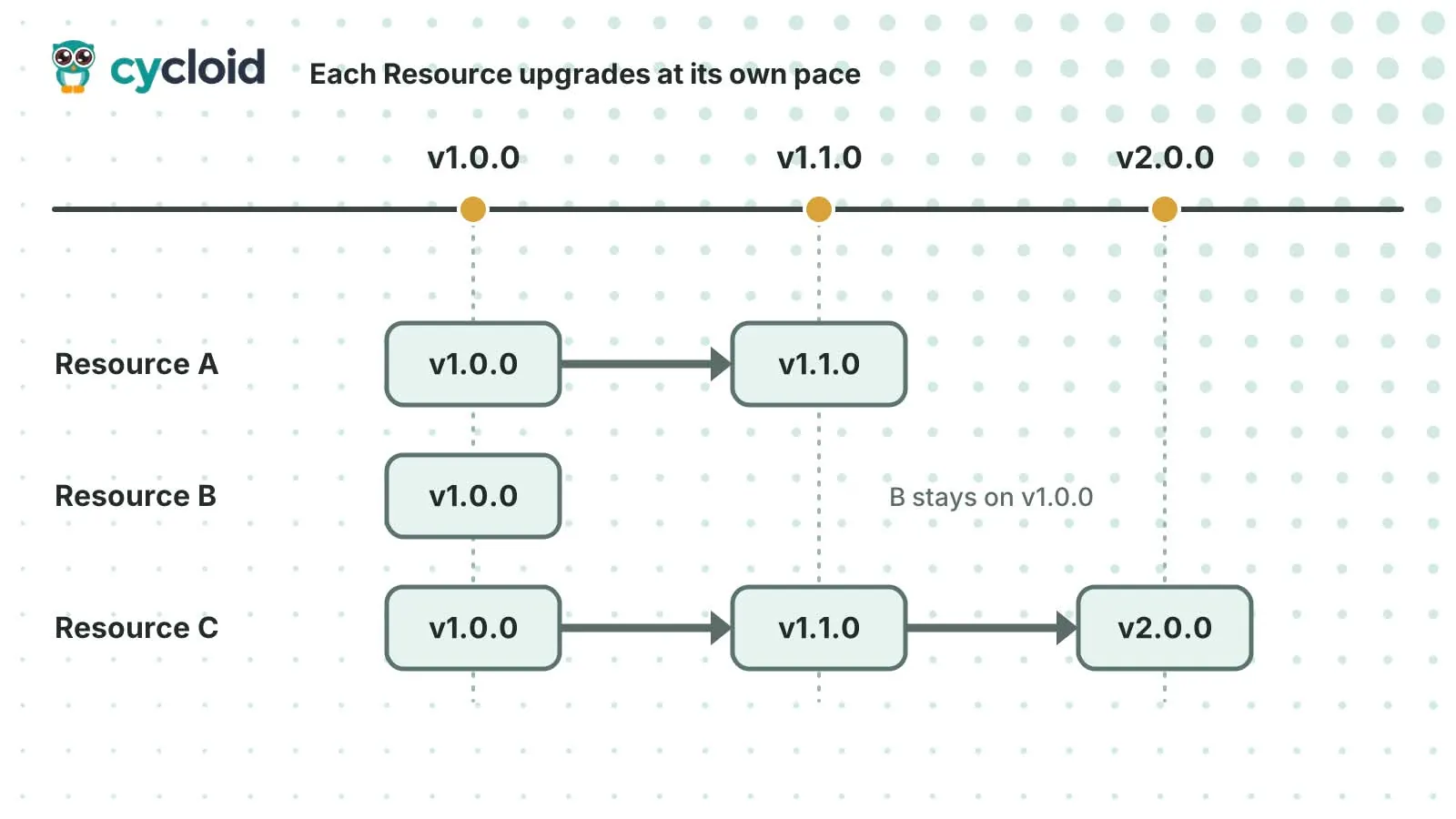
Versions are built into Cycloid, so a platform team can change a Blueprint without surprising the teams that already use it. The flow has five steps:
- Draft. The platform team edits a draft of the Blueprint and can deploy that draft to a test environment.
- Publish. Publishing creates an immutable version, numbered v1, v2, v3. The team can add a semver label (e.g., 1.1.0), release notes, and a flag that marks the version as breaking.
- Git. When a Blueprint lives in Git, pushes update the draft. Publishing stays explicit, or can be triggered by pushing a tag, in which case the tag becomes the label.
- Upgrade. Deployed Resources stay on their version. Their owners see “Upgrade available” and run the upgrade from the Resource, pre-filled with the current values. Crossing a breaking version requires explicit acknowledgment.
- Track. A usage view shows which Resources run which version.
Because each Resource stays on its own version, the platform team can ship a fix without forcing it on everyone on the same day, and each Resource upgrades at its own pace. Recovery is forward-only: a bad release is fixed by publishing a new version, not by rolling a Resource back.
For a multi-resource stack, the Resource Group shows which version each environment runs, for example, Development v3, Staging v2, and Production not yet deployed, and promotes it stage by stage.
The Delivery ledger adds the build view: which build each application and stage runs, and which stages are behind and ready to promote.
In the enterprise, a patched web service Blueprint ships as 1.1.0, each of the 40 teams upgrades when its release window allows, and the usage view shows which teams still run 1.0.0.
How Scorecards Show Whether Teams Stay on the Path
A golden path only works if teams stay on it, so the platform team needs to see whether the 40 teams follow the standard. Cycloid answers that with three views.
Scorecards grade every Resource from Basic to Bronze, Silver and Gold against the team’s own rules, such as owner assigned, runbook linked and monitoring configured. The distribution shows where the platform stands, and the trend shows whether it is improving.
Ownership coverage shows which Resources have no owner and which teams carry the gap.
DORA metrics come from real deployments, so the platform team measures delivery based on what actually ran rather than what teams report.
Conclusion: Governance Turns a Template Into Self-Service
A golden path is a supported route for a repeated task, and a template by itself leaves the hard parts open. For the enterprise, constrained inputs, checks before apply, role-based access, and versioned releases with visible usage turn the web service template into something 40 teams can use without a ticket, while the platform team keeps control.
To try this on your own platform, pick one task that generates the most tickets, such as a standard web service, and package it as a Blueprint with a Form, one guardrail, and a published version. Cycloid’s documentation shows how Blueprints, Forms, and authorization fit your existing Terraform code and tools.
FAQs
1. What is a golden path in platform engineering?
A golden path is an opinionated, supported, and self-service route for a repeated engineering task, such as creating a service or provisioning a database. Developers can leave it when they have unusual needs.
2. How is a golden path different from a service catalog?
A service catalog lists what already exists, with owners and dependencies. A golden path describes how to build the next service, so the two complement each other.
3. What makes a blueprint governed?
A governed blueprint pairs the template with constrained inputs, checks before applying, role-based access, and versioned releases. Those controls decide who can use the template, with which values, and at which version.
4. How does Cycloid constrain what developers can deploy?
A Cycloid Blueprint bundles a Form, a workflow, and Day-2 actions. The Form limits inputs, and conditions and approval rules gate the run. Four checks apply to every action, whether it comes from a person or an AI agent: what the requester can see, what they can do, under what conditions, and who must sign off.
5. Can teams upgrade a golden path at their own pace?
Yes. Each published version is immutable, and Resources stay on their version until their team upgrades. A usage view shows which Resources run which version.
Check our Comparisons: Cycloid vs Backstage / Cycloid vs Port / Cycloid vs Humanitec